MBO vs MBP: what order-by-order data really changes in order flow, and when Market By Price is enough
Published · updated · 17 min read
By Tom · Trader & founder of OrderFlowFutures
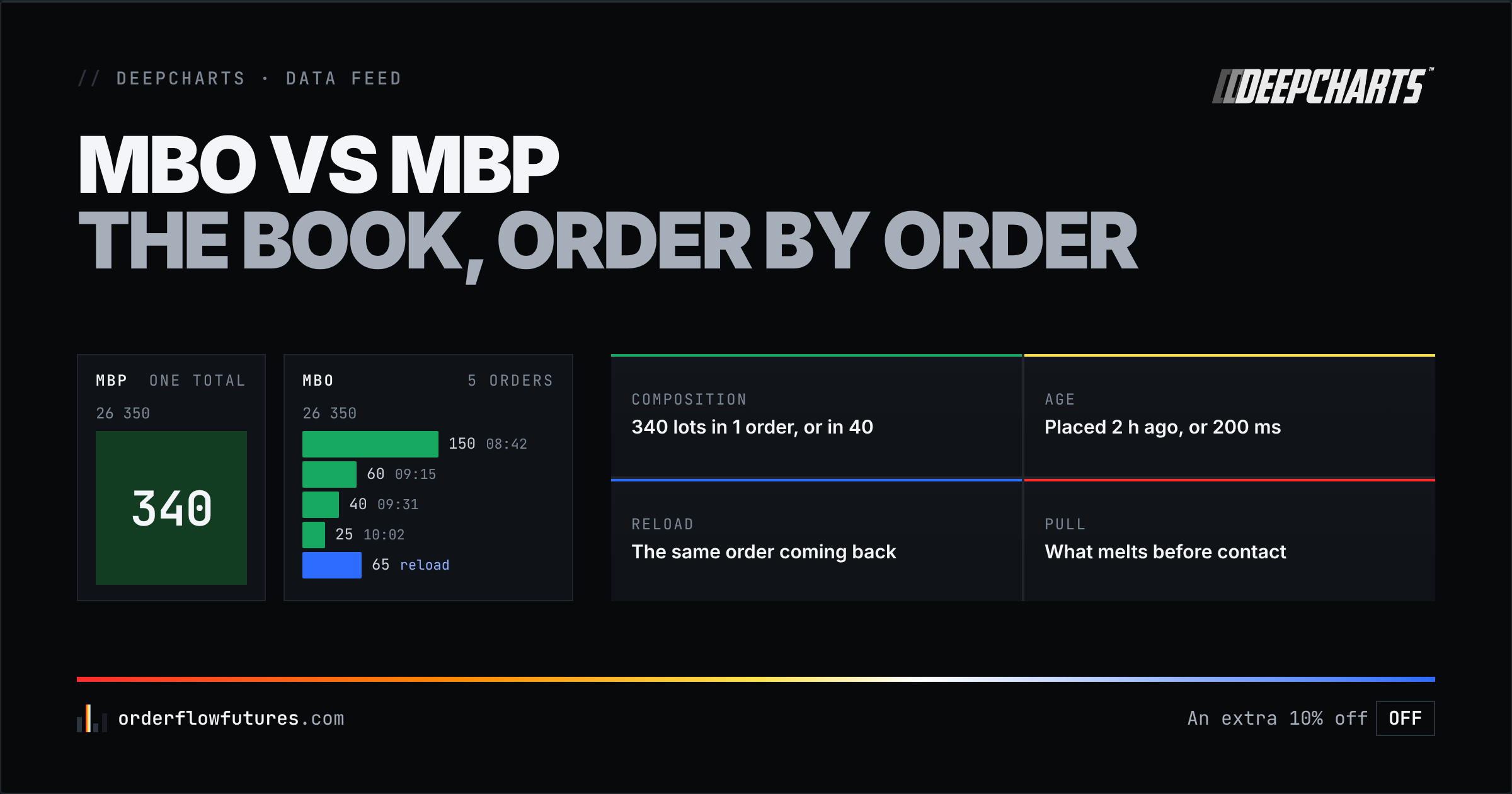
MBO vs MBP: what order-by-order data adds (composition, age, reloads, pulls), which DeepCharts tools require it, and when Market By Price is enough.
On your DOM, at 26,350, there are 340 lots on the bid. That is a number, and it is all a price-aggregated book will ever give you: 340. You do not know whether they belong to one participant or forty, whether they have been there for two hours or two hundred milliseconds, whether the same order just reloaded or a different one took its place. The number is identical in every one of those cases, and the read is nothing alike. The difference between MBO and MBP is exactly that: the first delivers the orders, the second delivers their sum.
This article says what each feed contains, what aggregation erases, which order flow tools only exist on MBO, when MBP is nonetheless enough, and how to pick the right Dom Type in DeepChart and DeepDom.
MBO (Market By Order) transmits every order in the book individually: its identifier, size, price and queue priority, then every modification, cancellation and execution one by one. MBP (Market By Price) adds those orders up per price level and transmits only the total, over a limited number of levels. Four pieces of information exist only in MBO: the composition of a level, the age of orders, the reload of the same order, and the pull before contact. Those are precisely the ones that make an order flow signal, which is why the DeepDom heatmap, the Iceberg Detector and Deep Trades need them. MBO is also the heaviest feed there is: DeepCharts' rule is MBO on a fast, stable line, MBP on a slow or patchy one.
---
1. Three tiers of data, and where the line sits
A futures data feed is sold in tiers, and the names change from one provider to the next. Here is what each tier actually contains.
| Tier | What it transmits | What you read | Common names |
|---|---|---|---|
| Level 1 | Best bid, best ask, and every trade with its side | Price, volume, delta, the footprint | L1, Top of Book |
| Aggregated Level 2 | Book depth, totaled per price level, over N levels | "340 lots at 26,350" | L2, MBP, Market By Price, DOM |
| Order by order | Every order in the book with its ID, size and priority, every modification and every execution | "340 lots in 12 orders, the largest is 150 and has been waiting since 8:42" | MBO, Market By Order, Level 3, Full Order Book |
The footprint and the delta live on the first tier: all they need is the side of each trade. The classic DOM lives on the second. Everything called heatmap, iceberg, reload or liquidity pull lives on the third, and that is what this article is about.
One clarification on the words "Level 2", because they cause most of the confusion. At most brokers, Level 2 means price-aggregated depth, in other words MBP. At DeepCharts, "Level 2" means the depth subscription with the data provider, and it is then the Dom Type field in Feed Settings that decides whether that depth arrives as MBO or MBP. The two are distinct: you need the depth subscription to get MBO, but having the subscription does not mean you are on MBO.
---
2. What MBP shows, and what it erases
MBP is not cut-rate data. It is the book as most traders have always seen it: a price ladder, a quantity next to each price, and those quantities moving. DeepCharts defines it plainly in its DeepDom release notes: "MBP, total combined volume at each price level".
The problem is not what MBP shows, it is what the addition erases. When 340 lots become 290 and then return to 340, MBP has seen three states of the total. It has not seen whether the 50 lots executed belonged to the big order or to ten small ones, nor whether the 50 that came back are the same participant reloading or a newcomer. When a 200-lot level melts to 20 as price approaches, MBP shows you a melting level; it does not tell you whether one 180-lot order was cancelled in one go, or eighteen 10-lot orders pulled one after another. Those are two different behaviors, from two different kinds of participants, and the total does not tell them apart.
Aggregation is an irreversible loss of information: once the orders have been added up, nobody can separate them again. That is why tools that need that separation cannot "estimate" MBO from MBP. They need the feed itself.
---
3. What MBO adds: four pieces of information that exist nowhere else
Both major futures venues broadcast their book order by order, and both document it. CME Globex, in its Market By Order Full Depth feed, "disseminates individual orders and quotes at every price level" for a given instrument, participants anonymous, with a priority number for each order that ranks it among the orders at the same price and side. Eurex does the same on T7 with EOBI (Enhanced Order Book Interface), the order-by-order book, alongside EMDI, which is price-aggregated depth over a limited number of levels. The FDAX course details what that changes on the DAX.
With that material, four things become readable. They are exactly the ones order flow exploits.
The composition of a level
340 lots in one order and 340 lots in forty orders do not mean the same thing. The first is a participant with an intention and the size to hold it; the second is a crowd, and a crowd leaves faster than it arrived. Deep Trades pushes that read all the way to the execution: that is what lets it say that a 228-contract trade was made of one-lot pieces (a hollow circle) or of a single 200-lot order (a filled circle). The Deep Trades article explains the four markers; without MBO, none of them exist.
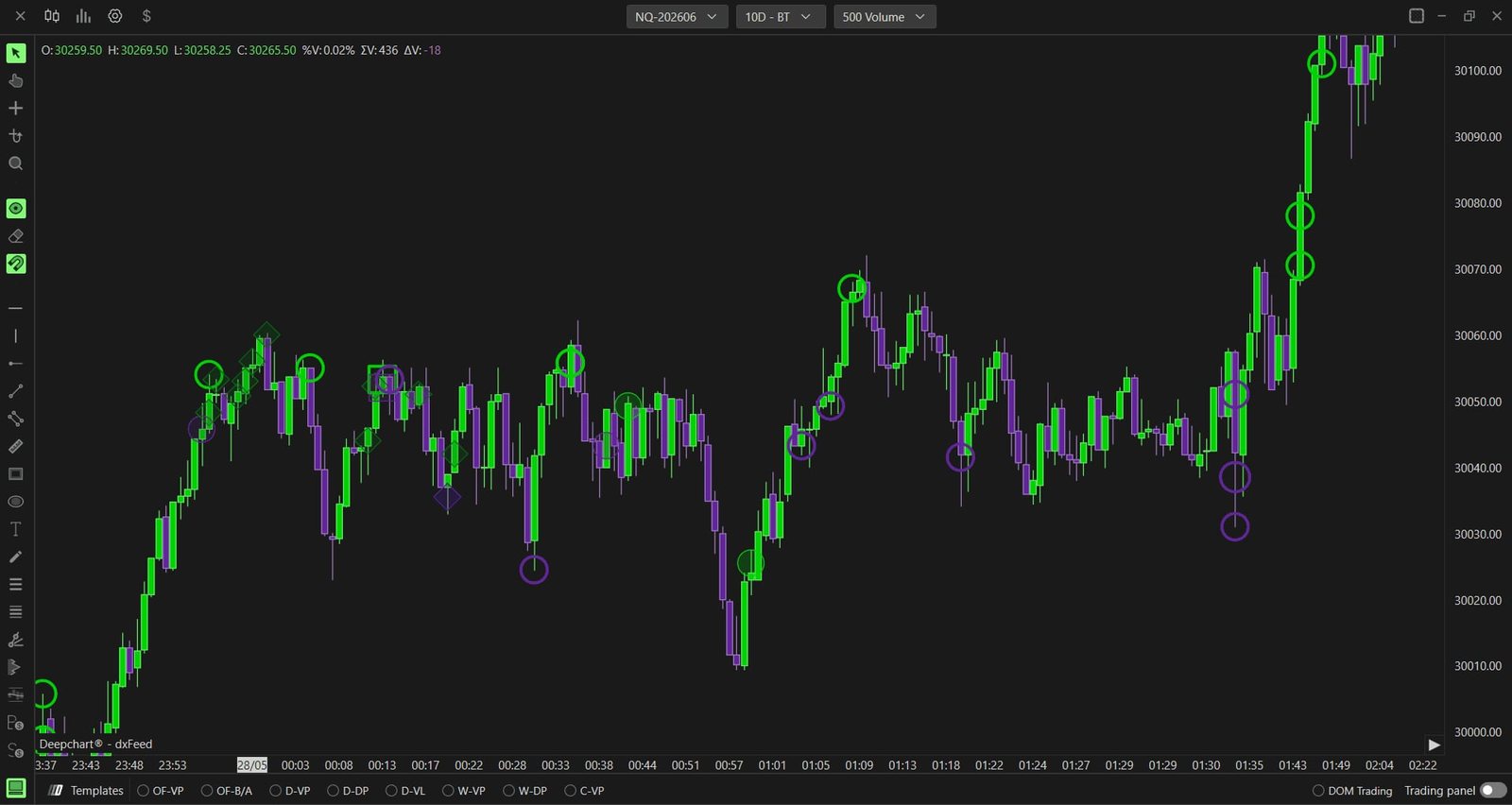
Screenshot © DeepCharts, help center, Deep Trades article. Each marker classifies the composition of a trade, information that only MBO carries.
The age of orders, and their place in the queue
An order placed two hours ago, never modified, that has survived three tests of the price, is not the same thing as an order placed three hundred milliseconds ago. MBO transmits a priority timestamp for each order, and DeepDom encodes that age in the persistence of its bands: a band that thickens on the heatmap is liquidity that has held. On an aggregated book, a quantity has no age, only a value.
Queue position matters to you too, when you trade with limits: on MBO, you know how many contracts sit ahead of yours at the same price, so whether your order stands a chance of being filled without price trading through.
The reload
An order executed, then an order of the same size reappearing at the same price a millisecond later: that is the signature of an iceberg. On MBP, the level goes from 340 to 290 and back to 340; you can suspect it, not prove it. On MBO, DeepDom's Iceberg Detector sees the slice consumed and the slice re-posted, and counts the reloads. It is the only way to tell a genuine wall, which is there in one block, from an iceberg, which only shows one slice at a time.
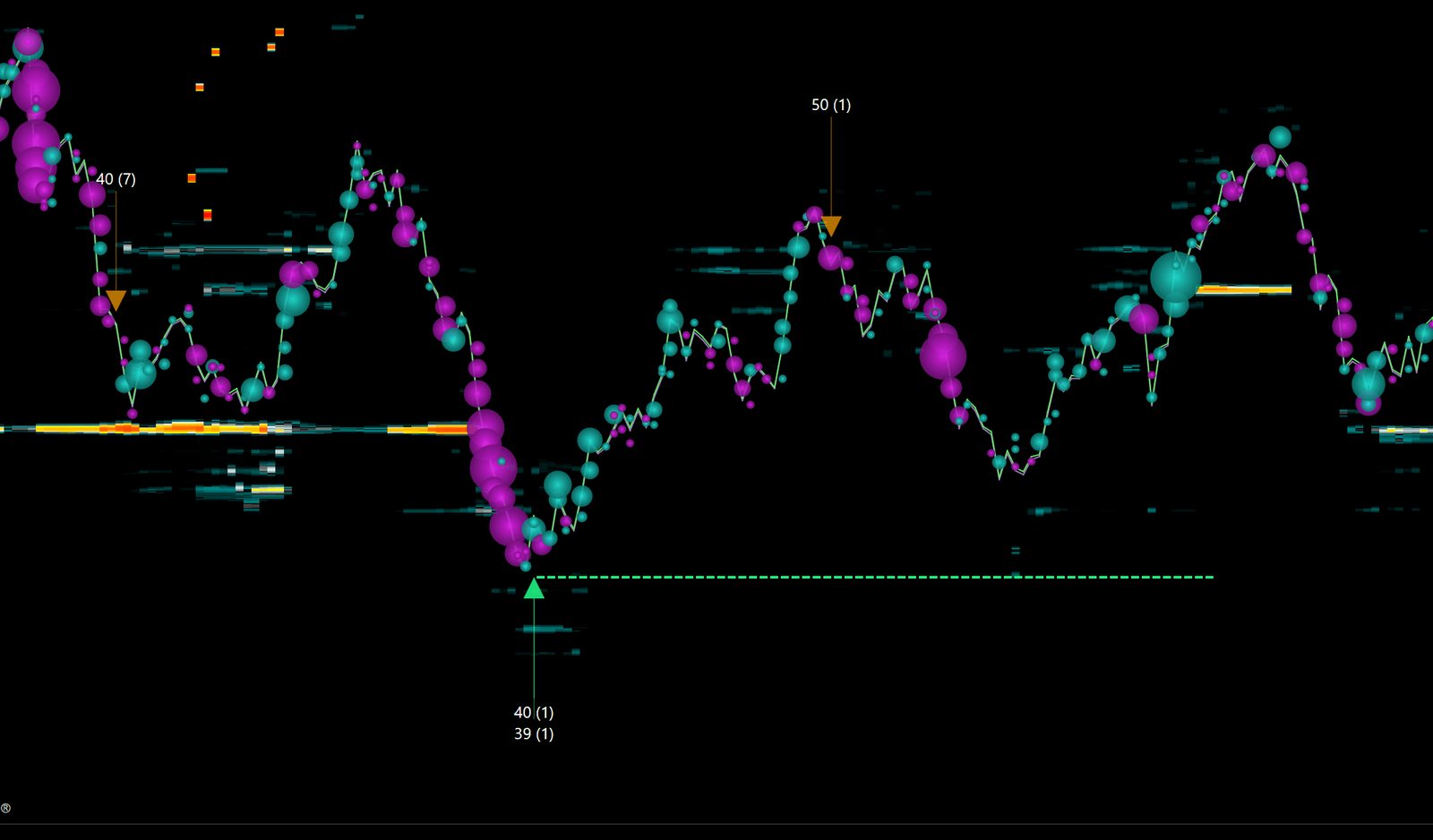
Visual © DeepCharts, DeepDom presentation. The Iceberg Detector arrows mark a slice re-posted at the same price after execution. That signature cannot be rebuilt from a per-level total.
The pull before contact
A 200-lot order that vanishes when price gets within two ticks was not liquidity, it was display. Aggregated data shows you a level melting; order-by-order data shows you which order melted, in one go or in pieces, and whether it reappears three ticks further. It is also the raw material for reading a stop hunt: what pulls before the break, and what waits behind it.
---
4. The tools that only exist on MBO
This is not a display preference, it is a condition of existence. On DeepCharts, as stated in the help center and release notes:
- Deep Trades: "Deep Trades requires MBO data". Rithmic Level 1 or Level 2, dxFeed Level 2 with Dom Type set to MBO; dxFeed Level 1 is not supported. The Deep Trades tutorial covers the settings.
- The DeepDom heatmap: "DeepDom requires Level 2 data", and DeepCharts asks you to "use MBO in both DeepChart and DeepDom Feed Settings". DeepDom analyzes "the most granular data available (tick by tick + MBO)". The heatmap course starts from there.
- The Iceberg Detector and Stop Run detection: both rely on tracking every order, the reload for one, the pull and the burst for the other.
- Deep Prints' bid/ask split: exact and tick-stamped because it reads the side of every execution in the order-by-order feed instead of estimating it.
What works perfectly well without MBO: the footprint, delta and CVD, volume profile, imbalances, Big Trades (the former Deep Trades, on aggregated trades), the classic DOM. That is a long list, and it is why the next section exists.
---
5. When MBP is enough
MBO is the heaviest feed a trading workstation can receive, because it transmits every order, every modification and every cancellation, and an NQ book at the US open produces thousands of them per second. DeepCharts says so plainly in the dxFeed Prop connection guide: "Under DOM Type, select MBO for the most granular market depth on a fast and stable connection, or MBP for a lighter feed". And the prescribed fix when it falls behind is just as direct: "If MBO causes data delays, switch to MBP in Feed Settings and reconnect".
Before choosing, DeepCharts asks you to measure. The Diagnostic Report (? icon, Contact Support, "I have a problem or delay with the platform") shows ping to Europe and the US, then the download speeds measured after confirmation. The DeepDom release notes set the floor: a minimum 20 Mbps download speed with your data feed provider, 8 GB of RAM, 16 GB when DeepChart and DeepDom run together, and "if you are using L2 data, your network requirements will be significantly higher than L1".
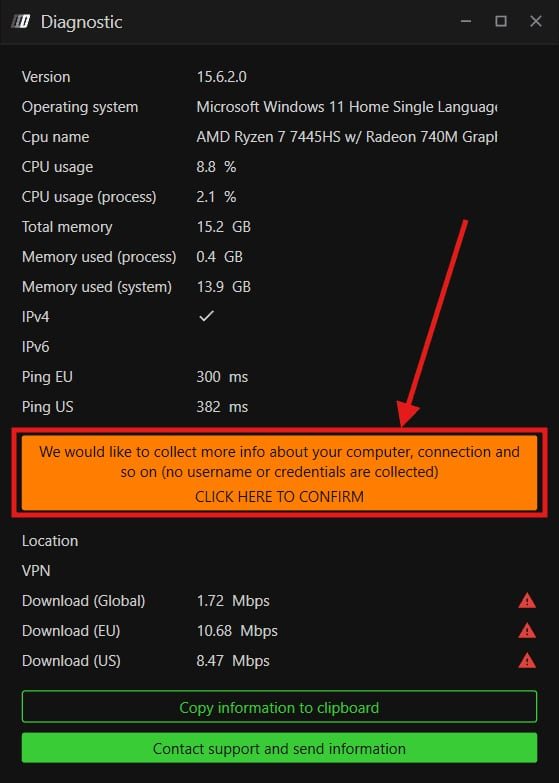
Screenshot © DeepCharts, help center, dxFeed prop firm connection guide. On this line, all three download speeds carry a red triangle: that is the case where DeepCharts advises MBP.
Three situations where MBP is the right choice, not a fallback:
- Your line cannot keep up. A book two seconds behind is worse than an aggregated book that is on time. The moments when MBO falls behind are precisely the ones when you would need it: the open, news releases, stop bursts. A red triangle in the diagnostic settles the question.
- You trade off the footprint and the delta. If your method rests on imbalances, volume profile and delta divergences, everything you need is at Level 1. MBO would change nothing about your signals, only your bill and your network load.
- You are starting out. The order-by-order book is an avalanche of information, and nobody reads it usefully before having a solid read of price and volume. Getting started in order flow happens on the footprint; MBO comes later, once you know which question to ask it.
The rest of the time, for anyone reading the heatmap, hunting icebergs or relying on Deep Trades, MBO is not an option. It is the feed those tools read.
---
6. Which feed delivers MBO, and what it costs
The two feeds for which DeepCharts documents MBO are Rithmic and dxFeed. The DeepDom release notes list them as follows: "Rithmic, MBO and MBP support" and "dxFeed, MBO and MBP support, Level 2 market depth required for MBO features". For DeepDom, DeepCharts adds that "Rithmic RAPI is the recommended and most stable protocol".
- Rithmic has delivered the CME's order-by-order book for a long time, which is why most heatmap platforms were born on it. The connection goes through Rithmic RAPI, with your prop firm's Server and a Gateway: Rithmic tutorial. For Deep Trades, DeepCharts states that Rithmic Level 1 is enough; for DeepDom, you need the depth.
- dxFeed delivers MBO provided you have the Level 2 depth subscription and set Dom Type to MBO. It is the feed of most prop firms that integrate DeepCharts: dxFeed Prop tutorial.
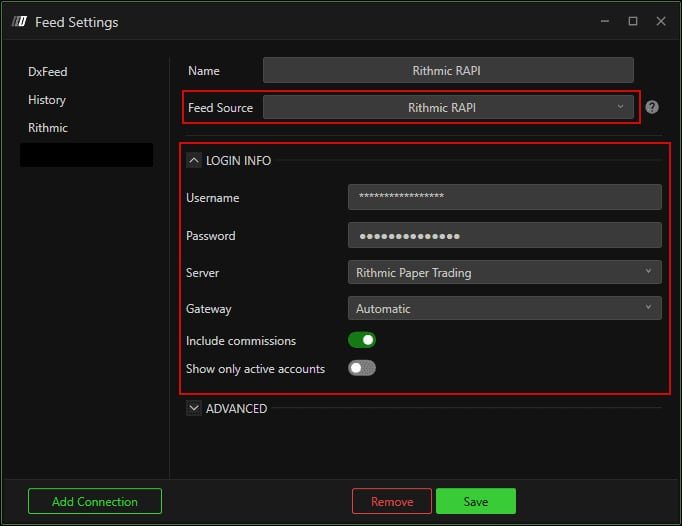
Screenshot © DeepCharts, help center, Rithmic prop firm connection guide. On the Rithmic side there is no Dom Type field: the depth follows the account's subscription.
The cost breaks down into three parts, and they must be kept separate because they are not billed by the same people. Prices checked on 15 October 2026, details and date on the DeepCharts promo code page:
| Part | Who bills it | Order of magnitude |
|---|---|---|
| The DeepChart or DeepDom license | DeepCharts | depends on the plan, monthly or yearly |
| The data feed | dxFeed or Rithmic | dxFeed from $19/mo, Rithmic from $57/mo |
| MBO depth | the exchange, through the feed | $39/mo on CME, +$65/mo for Eurex |
Promo code OFF covers the first part, the DeepCharts plans, and that part alone: no partner discount ever applies to the feed or to exchange fees. If a prop firm issues you dxFeed credentials, the feed comes with your funded account; what remains is to check with them whether Level 2 depth is included too, because that is what conditions MBO.
On Eurex, order-by-order depth is a surcharge billed by the exchange, on top of the base feed. It is the entry ticket to order flow on the DAX, and it is where MBO pays off most on screen: fewer orders per level than on the ES, a wider tick, every reload shows more clearly.
---
7. Setting the Dom Type in DeepChart and DeepDom
In DeepChart: Select a connection, Feed Settings, Add Connection, Feed Source set to dxFeed Prop, the credentials your prop firm sent under LOGIN INFO, and right below, the Dom Type field with two values: Mbo and Mbp. Mbo is the value shown by default.
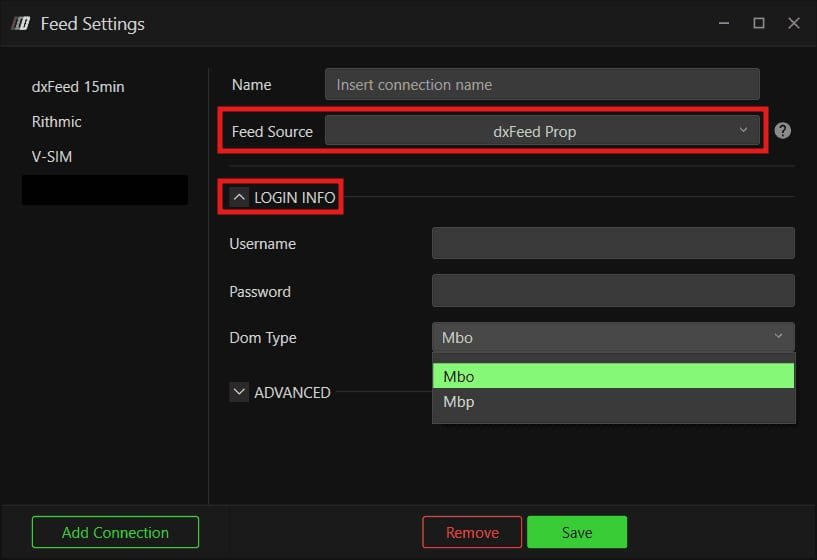
Screenshot © DeepCharts, help center, dxFeed prop firm connection guide. The choice between MBO and MBP lives in this menu, and it can be changed at any time, followed by a reconnect.
In DeepDom, same form, same credentials, and DeepCharts recommends Mbo on both sides: the two platforms run side by side on the same feed without conflict.
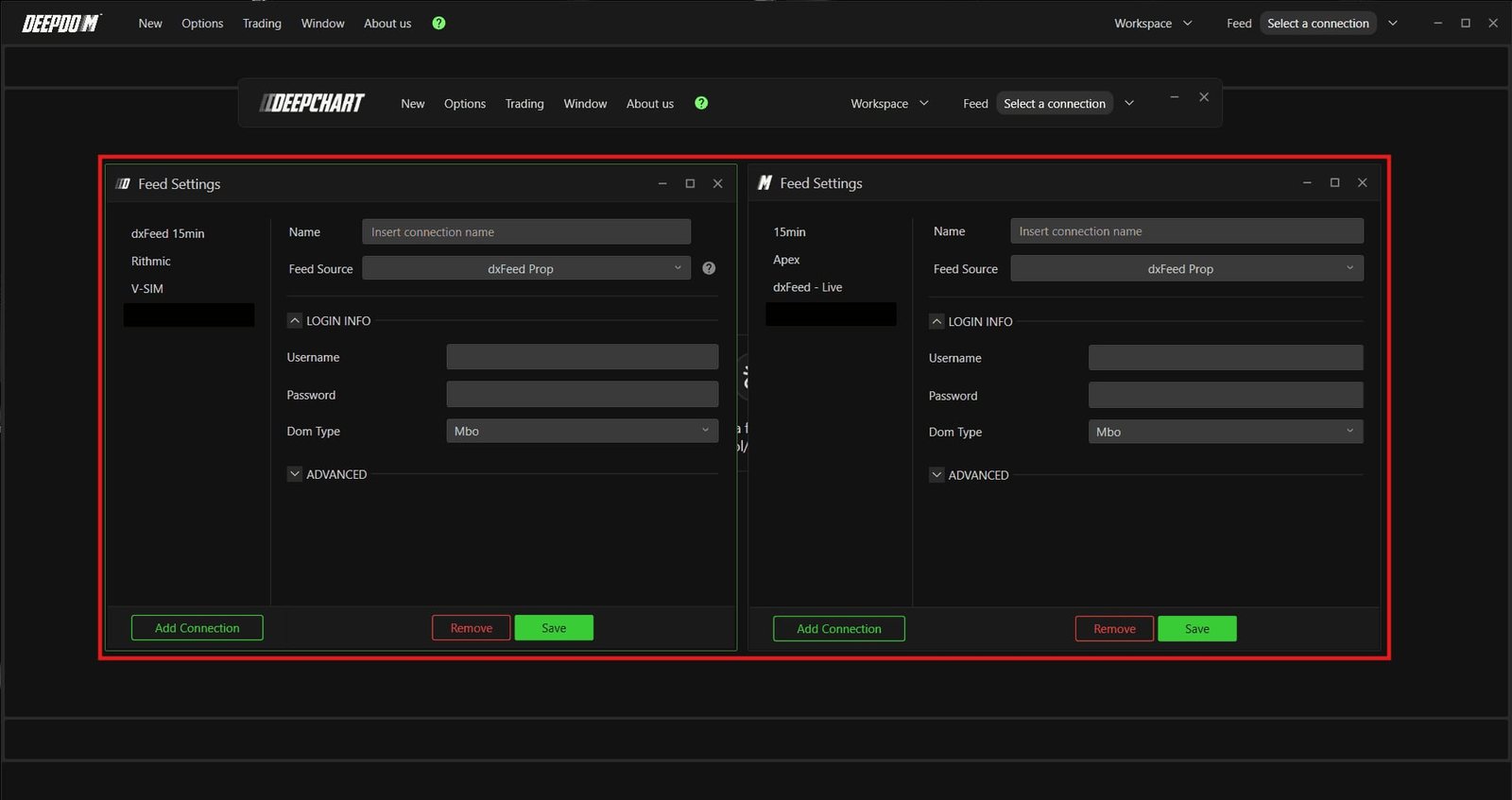
Screenshot © DeepCharts, help center, dxFeed prop firm connection guide. DeepChart on the left, DeepDom on the right, Mbo on both.
Two things to know before switching:
- MBO cannot be downloaded retroactively. DeepCharts writes it for Deep Trades: MBO data "cannot be downloaded historically from the data provider", it is "stored locally while the platform is running". In practice, everything that depends on MBO is empty on day one and fills in session after session, as long as DeepChart runs during the session. A data deletion that reaches too far back can wipe it for good.
- Changing the Dom Type is reversible and immediate. Feed Settings, Mbp, Save, reconnect. If the book picks its pace back up, it was the line. Then rerun the Diagnostic Report, and send it to support if the lag persists.
---
8. What MBO does not tell you either
It does not say who. CME broadcasts its orders with "participants anonymous", Eurex transmits an order identifier, not a member. You recognize behaviors, never names.
It does not show stops. A stop is not in the book, on any venue, until it is triggered. You see its triggering as aggression, not its presence.
It does not show the hidden part of a native iceberg. The exchange only broadcasts the displayed slice. The total size is inferred from the number of reloads and the volume executed at the level, never from the book.
It does not give you the direction. A large order that reloads may be a defense that will hold or a defense that will give way in ten seconds. MBO shows you the defense as it happens; the price reaction right after says whether it held. It is the same rule as for effort and result: the material is never the signal, the reaction is.
---
9. Activating DeepCharts on MBO
The tools in this article, the DeepDom heatmap, the Iceberg Detector, Deep Trades, are DeepCharts tools: you need a platform license, a Rithmic or dxFeed feed, and MBO depth. The DeepCharts pillar details every tool and every plan, and the liquidity heatmap sheet sums up what DeepDom does with MBO.
Activate DeepCharts →: promo code OFF comes already filled in: an extra 10% off every plan, monthly or yearly, on top of whatever discount DeepCharts is running. Not using the link? Enter OFF at the Payment step. Details and per-plan math: DeepCharts promo code.
This is a partner link and it keeps this site running. The reservations in this article, the heavy feed, the non-retroactive MBO, the MBP that is enough for many methods and the feed fees the code does not apply to, are here because they are true, not because they help sell.
---
Frequently asked questions
What is the difference between MBO and MBP?
MBO (Market By Order) transmits every order in the book individually, with its identifier, size, price and priority, then every modification, cancellation and execution. MBP (Market By Price) adds those orders up per price level and only transmits the total per level, over a limited number of levels. MBO is finer and heavier; MBP is lighter and loses the composition, age, reload and pull of orders.
Is MBO the same as Level 2?
Not exactly. At most brokers, "Level 2" means price-aggregated depth, in other words MBP. On DeepCharts, the Level 2 depth subscription is the prerequisite, and the Dom Type field in Feed Settings decides whether that depth arrives as MBO or MBP. MBO is sometimes called "Level 3" or "full order book".
Which DeepCharts tools require MBO?
Deep Trades ("requires MBO data"), the DeepDom heatmap (DeepCharts recommends MBO in both DeepChart and DeepDom), the Iceberg Detector and Stop Run detection, which rely on tracking every order. The footprint, delta, volume profile, imbalances and Big Trades work without MBO.
Which data feed delivers MBO on DeepCharts?
Rithmic (MBO and MBP, through Rithmic RAPI, recommended by DeepCharts for DeepDom) and dxFeed (MBO and MBP, with a Level 2 depth subscription and Dom Type set to MBO). For Deep Trades, DeepCharts accepts Rithmic Level 1 or 2 and dxFeed Level 2; dxFeed Level 1 is not supported.
When should you choose MBP over MBO?
When the line cannot keep up: low or patchy download speeds in the Diagnostic Report, a book lagging at busy moments. DeepCharts' rule: MBO on a fast, stable connection, MBP for a lighter feed, and "if MBO causes data delays, switch to MBP and reconnect". MBP is also enough for a method built on the footprint and the delta.
How much does MBO cost?
Three separate parts: the DeepCharts license (the only part code OFF is taken on), the data feed (dxFeed from $19/mo, Rithmic from $57/mo) and the MBO depth billed by the exchange ($39/mo on CME, +$65/mo for Eurex), prices checked on 15 October 2026. No partner discount applies to the feed or to exchange fees.
Why are my MBO tools empty on past sessions?
Because MBO data cannot be downloaded retroactively: DeepCharts stores it locally while the platform runs. It only exists for the sessions during which DeepChart was open and connected on MBO.
Want to get better at order flow?
We discuss flow, liquidity and our trades live, every day, on the OrderFlowFutures Discord. Join us, it's free.
Join the Discord for free16 online·108 members·Free · instant access
Read next
Get the new guides
One email when we publish an OrderFlow or Heatmap guide. No spam, one-click unsubscribe.
By subscribing, you agree to receive our emails. Educational content, not investment advice.