Published
DeepChart connects to a Rithmic prop firm account through the Rithmic RAPI source. The key prerequisite happens elsewhere: Rithmic requires you to sign its agreements in RTrader Pro and declare yourself Professional or Non-Professional, otherwise the connection fails or stays "not authorized" even with correct credentials. This tutorial covers the agreements, the form, Symbol Manage, the chart and DeepDom.
- A purchased or funded prop firm account running on Rithmic
- The Rithmic credentials (username and password) from the prop firm's email or dashboard
- RTrader Pro, downloaded from the link your prop firm provides
- DeepChart installed with an active licence
- The general feed profile and exchange logic, covered in our tutorial "Connecting a data feed to DeepCharts"
Step by step
- 01
Get your Rithmic credentials
Your prop firm sends a Rithmic Username and Rithmic Password once you buy an evaluation or get funded, by email or in your dashboard. They are separate from your prop firm portal login: never use the latter for Rithmic.
- 02
Understand why RTrader Pro comes before DeepChart
Rithmic requires several electronic agreements (risk disclosures, market data usage, order routing) before any third party platform may open a data or trading connection. Until they are accepted, DeepChart either fails or sits in a "not authorized" state, whether your credentials are right or not. Some prop firms sign on your behalf: logging into RTrader Pro once is the only way to be sure.
- 03
Log into RTrader Pro on the right System
Install RTrader Pro from your prop firm's link, then enter your Rithmic credentials. Under System, look for your prop firm's name in the list; if it is not there, pick Rithmic Paper Trading. One exception: Bulenox accounts go through Rithmic Paper Trading, not the Bulenox entry. For Gateway, pick the one nearest to you or Chicago Area, then Login.
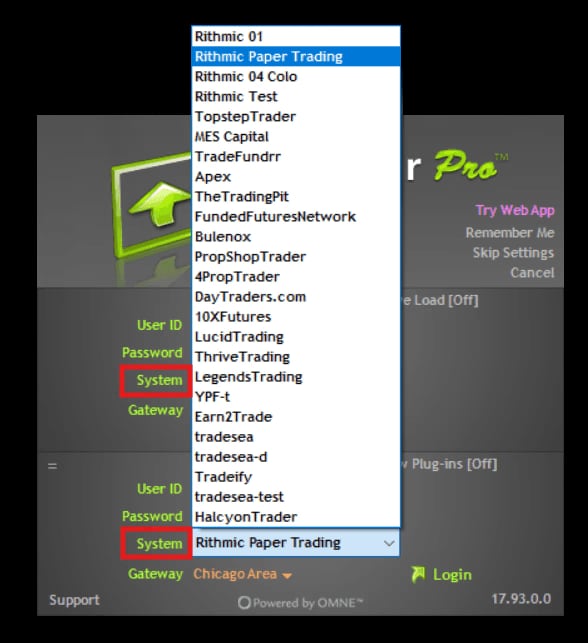
The RTrader Pro login screen with the System list open on the prop firms and Rithmic Paper Trading, Gateway Chicago Area.© DeepCharts - 04
Declare your status: Non-Professional in most cases
If agreements are pending, RTrader Pro shows them straight away, along with the market data status question. Non-Professional covers individual traders using the data for their own personal trading, with lower exchange fees: that is the vast majority of prop firm traders. Professional is for licensed advisors, analysts and business or institutional use, with higher exchange fees. If in doubt, ask your prop firm before ticking Professional.
- 05
Accept every agreement all the way through
Read each window and click Accept until you land on the main RTrader Pro interface with no further prompts. You can then close RTrader Pro: the signatures live on Rithmic's servers, and it does not need to stay open while you trade in DeepChart. You only go through this again after an account reset, or if Rithmic introduces new mandatory agreements.
- 06
Fill in the Rithmic RAPI connection
In DeepChart, Feed Settings, Add Connection. Feed Source set to Rithmic RAPI, a clear Name, then under LOGIN INFO your Rithmic Username and Password, with no leading or trailing spaces. Server follows the same rule as in RTrader Pro: your prop firm's name, otherwise Rithmic Paper Trading (Bulenox included). Gateway on Automatic lets DeepChart pick the closest one; to set it yourself, run the Diagnostic Report first and compare the EU and US pings. Include commissions folds commissions into P&L, Show only active accounts hides inactive ones.
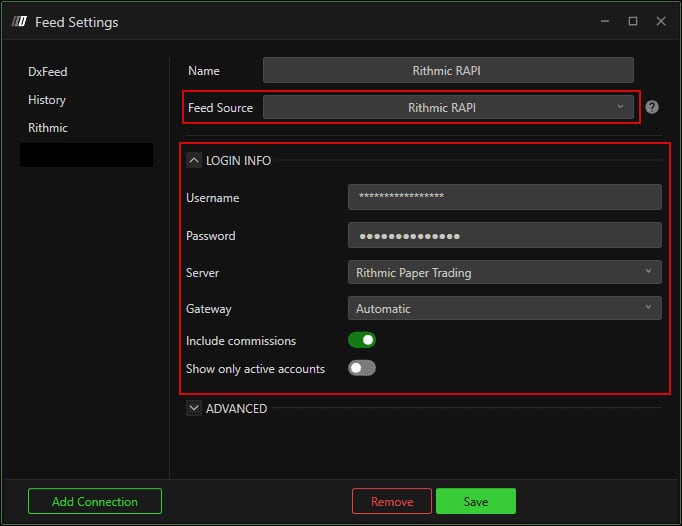
The Feed Settings window on Rithmic RAPI, credentials masked, Server Rithmic Paper Trading, Gateway Automatic, Include commissions on.© DeepCharts - 07
Check the advanced options, Connect only trading above all
The ADVANCED section holds three settings. Connect only trading limits the connection to execution, with no market data at all: never turn it on if this connection feeds your charts in Symbol Manage, they would stop loading. Use RTrader Pro Plugin only matters if you connect through the RTrader Pro plugin. Connection portfolio mode stays on Native (positions read from the broker) unless you have a specific reason to use Avg Price.
- 08
Save, then connect
Save, then pick the Rithmic RAPI connection from the Feed menu. The dot turns green. A rejection at this point with credentials you have double checked almost always comes down to the agreements or the wrong Server.
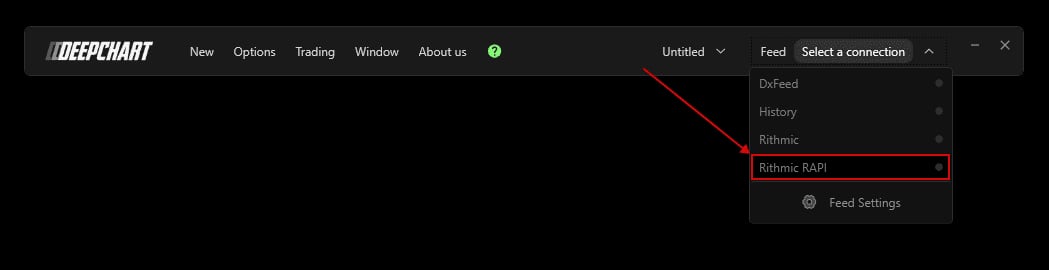
The DeepChart Feed menu with the Rithmic RAPI connection highlighted.© DeepCharts - 09
Map the exchange and open a chart
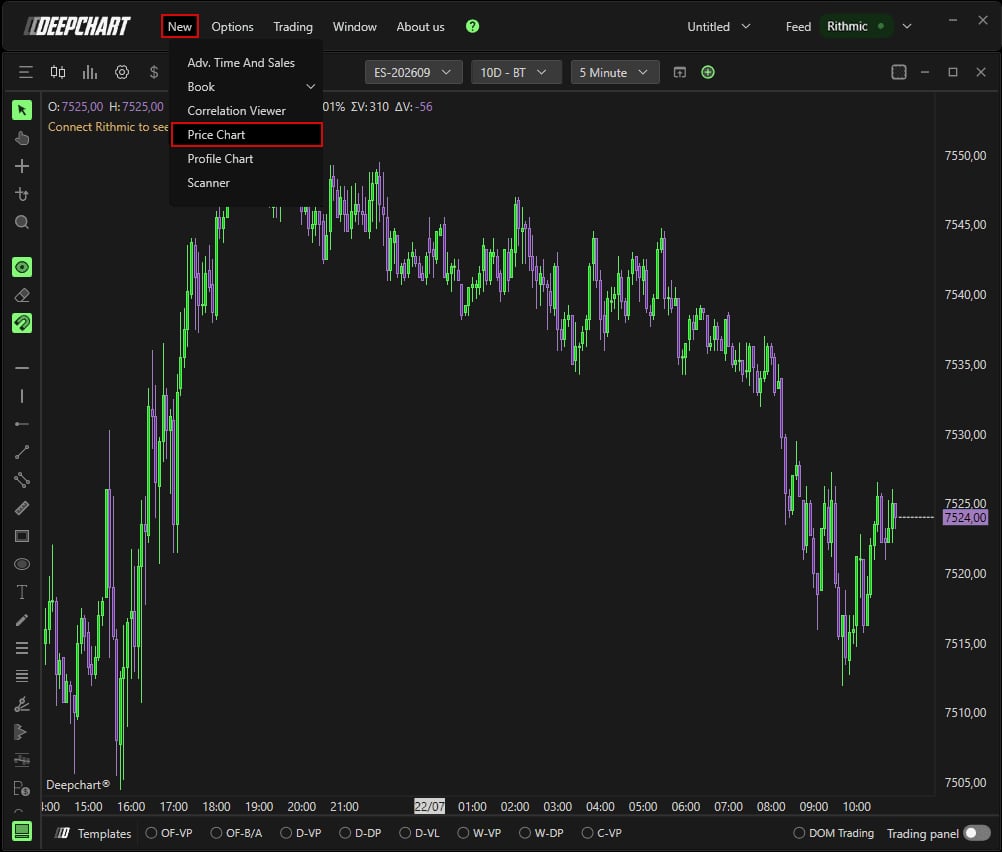
Options, Symbol Manage: the exchange your contracts trade on (CME for ES, NQ, MES, MNQ) must point to your Rithmic connection in the Data Feed column. Listed exchange: right click the Data Feed cell, choose the Rithmic connection, Set. Missing exchange: Subscribe, find it, assign Rithmic, Select. Then New, Price Chart, ES or NQ, OK: the chart loads live.
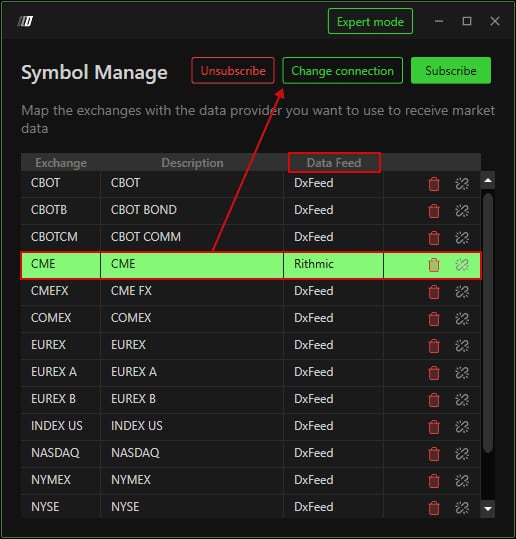
The DeepChart Symbol Manage window, CME row mapped to Rithmic in the Data Feed column.© DeepCharts - 10
Hook up DeepDom with the same Server and Gateway
DeepChart and DeepDom share the same Rithmic bridge: no extra credentials to request. In DeepDom, open the connection settings, enter the same Rithmic credentials and, crucially, the same Server and Gateway as in DeepChart, then connect. Both platforms then run side by side on the same feed without conflict.
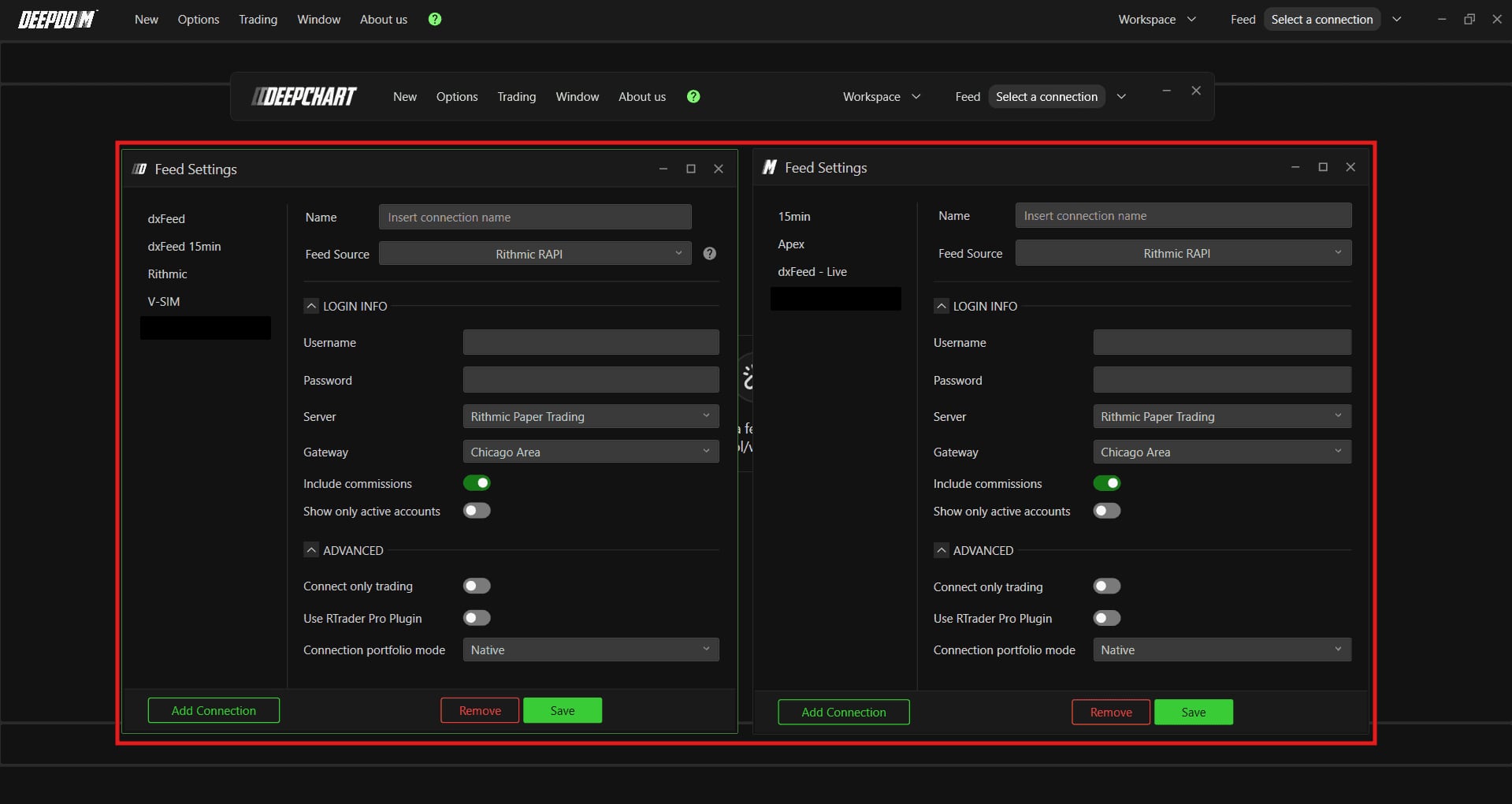
The DeepChart and DeepDom Feed Settings windows side by side on Rithmic RAPI, same Server and Gateway, Advanced section expanded.© DeepCharts
Settings, tab by tab
A one time job, before the first DeepChart connection.
The ones issued by the prop firm, not your prop firm portal login.
Not listed, or a Bulenox account: Rithmic Paper Trading.
Chicago Area acts as the global server.
Professional: advisors, analysts, business use, higher exchange fees.
Until the main interface shows with no further prompts.
The prop firm's name, for instance.
No leading or trailing spaces in the password.
Same rule as the RTrader Pro System: otherwise Rithmic Paper Trading.
Automatic: DeepChart picks the closest. Otherwise choose from the Diagnostic Report's EU and US pings.
Folds broker commissions into the P&L calculation.
When on, only active accounts are listed.
Execution only, no market data. Never on a connection that feeds your charts.
Only for a connection made through the RTrader Pro plugin.
Native: broker positions. Avg Price: positions computed by DeepChart from the average price.
Listed exchange: right click the cell, then Set. Missing exchange: Subscribe, then Select.
⚠ Traps to avoid
- Connecting DeepChart without going through RTrader Pro first. With unsigned agreements the connection fails or stays "not authorized" while the credentials are fine. It is the first thing to check, even if your prop firm says it signed on your behalf.
- Ticking Professional by mistake. An individual prop firm trader almost always qualifies as Non-Professional; Professional status comes with higher exchange fees.
- Picking the Bulenox entry as Server or System. Bulenox accounts go through Rithmic Paper Trading, in RTrader Pro and in DeepChart alike.
- Turning on Connect only trading on the connection that feeds your charts. It stops pulling any market data and the charts no longer load.
- Using a different Server or Gateway in DeepDom than in DeepChart. Both platforms share the same Rithmic bridge: credentials, Server and Gateway must match.
- Using your prop firm portal login instead of the Rithmic credentials. Two different pairs, and only the Rithmic one opens the connection.
FAQ
Why does my Rithmic connection stay "not authorized" when my credentials are correct?+
Almost always because the Rithmic agreements are not signed. Log into RTrader Pro once with the same credentials and the right System, accept every agreement until you reach the main interface, close it, then reconnect in DeepChart.
Professional or Non-Professional: which one on a prop firm account?+
Non-Professional if you trade for yourself, which is the case for most prop firm traders. Professional is for licensed financial advisors, analysts and business or institutional use, with higher exchange fees. If unsure, ask your prop firm before confirming.
Do I need to keep RTrader Pro open while trading in DeepChart?+
No. Once accepted, the agreements are stored on Rithmic's servers and you can close RTrader Pro. You only go back after an account reset, or if Rithmic introduces new agreements.
My prop firm is not in the Server list, what do I do?+
Pick Rithmic Paper Trading, in RTrader Pro and in DeepChart. It is also the right choice for a Bulenox account, even though a Bulenox entry shows in the list.
Which Gateway should I use from Europe?+
The simplest is Automatic: DeepChart picks the closest one. If you want to set it yourself, run the Diagnostic Report and compare the EU and US pings before choosing the region. Then keep exactly the same Gateway in DeepDom.
Want to get better at order flow?
We discuss flow, liquidity and our trades live, every day, on the OrderFlowFutures Discord. Join us, it's free.
Join the Discord for free9 online·82 members·Free · instant access