DeepCharts Web is out: DeepCharts order flow in the browser, free on CFDs, crypto and delayed futures
Published · updated · 12 min read
By Tom · Trader & founder of OrderFlowFutures
DeepCharts Web, out November 1, 2026: DeepCharts in the browser, no Parallels on Mac, free on CFDs, crypto and delayed futures.
Ever since the platform launched, the first question from a Mac trader discovering DeepCharts has always been the same: "is there a web version?". And until now the answer fit in one slightly discouraging sentence: no, it is Windows software, and on a Mac you need Parallels Desktop plus a Windows licence.
That answer just changed. Tonight, November 1, 2026, DeepCharts releases DeepCharts Web, the platform in the browser, at web.deepcharts.com. This article covers exactly what is being released, what the "100% free" in the announcement actually means, what the web version is really worth for reading order flow, what the installed version keeps, and what we still do not know on launch day.
DeepCharts Web is the browser version of the DeepCharts order flow platform, launched on November 1, 2026 at web.deepcharts.com. Nothing to install: it opens in a tab, so on Mac, Windows, Linux or Chromebook, with no Parallels. It is announced as 100% free on three kinds of data: CFDs, crypto and delayed futures. The official announcement highlights six tools, Volume Profile, Deep Print, Delta Profile, Imbalance Tracker, VWAP and Speed of Tape, along with a built-in simulation account and Time & Sales. Real-time CME futures remain the territory of the DeepCharts licence, where promo code OFF gives an extra 10% off.
---
1. What is being released tonight, exactly
Checked on November 1, 2026 against DeepCharts' official announcement visuals, published on release day. Both images in this article are theirs.
| DeepCharts Web | |
|---|---|
| Address | web.deepcharts.com |
| Release | November 1, 2026, in the evening |
| Installation | none, everything runs in the browser |
| Free on | CFDs, crypto, delayed futures |
| Highlighted tools | Volume Profile, Deep Print, Delta Profile, Imbalance Tracker, VWAP, Speed of Tape |
| Trading | built-in simulation account ("DEEP SIM"), trading panel, Time & Sales |
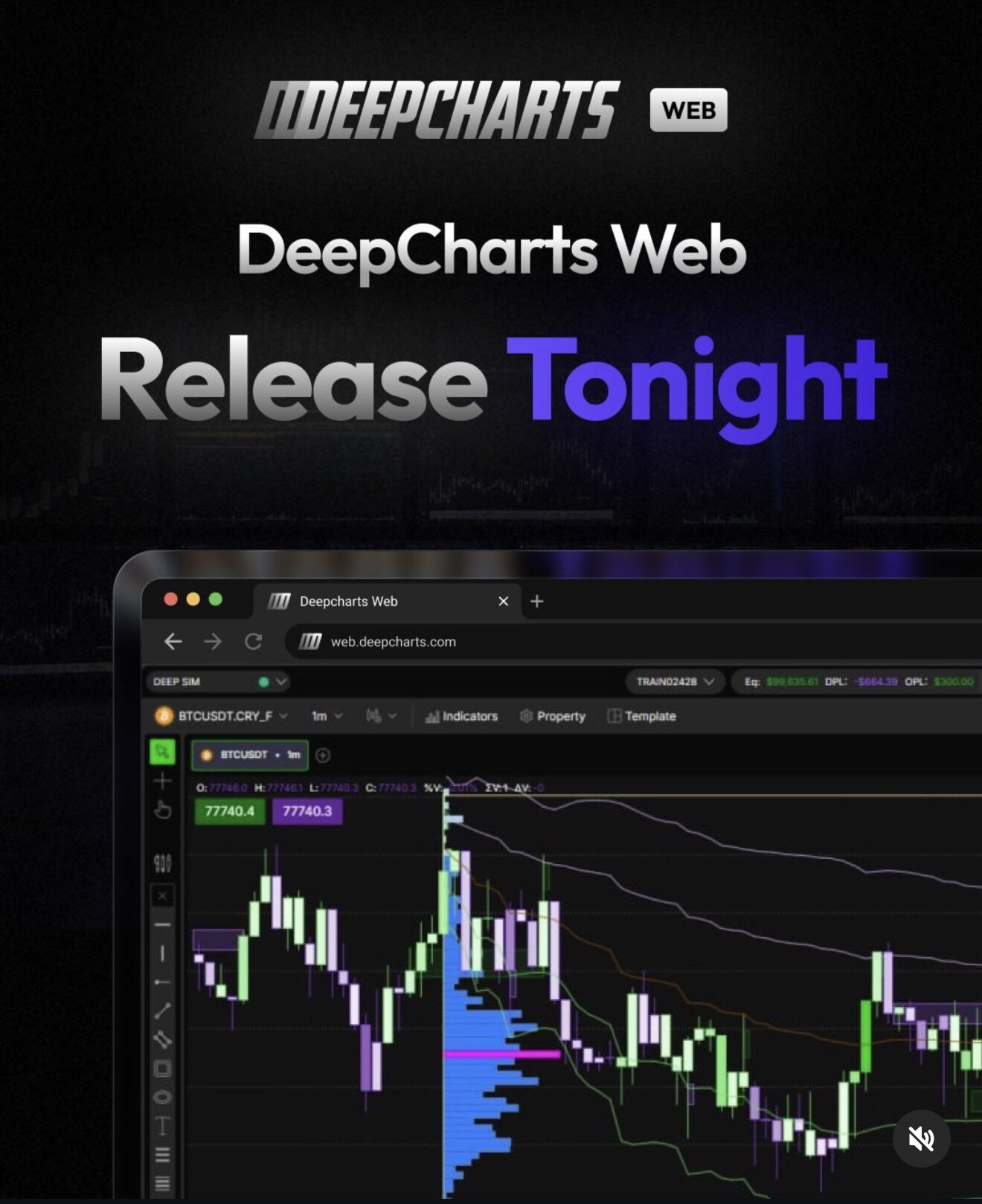
Visual © DeepCharts, DeepCharts Web launch announcement, November 1, 2026. You can read the "Deepcharts Web" tab, the web.deepcharts.com address, the connected DEEP SIM account (green dot) and a one-minute BTCUSDT chart.
What the screenshot shows, read line by line:
- A simulation account connected from the start. Top left, "DEEP SIM" with a green dot, and on the right a training account with its equity (Eq), daily P&L (DPL) and open P&L (OPL). So you can practise placing orders with no real money, in the browser.
- A real-time crypto instrument. The symbol shown is BTCUSDT on one minute, with the CRY_F suffix. The green and purple labels give the best buy and sell prices.
- The desktop toolbar. Indicators, Property, Template, and on the left the drawing tools column: lines, rectangles, ellipses, text. This is not a stripped-down phone version, it is the charting interface DeepChart users already know.
- A volume profile and VWAPs on the chart. The blue profile in the middle of the image, with its POC in magenta, and the bands around price.
---
2. What "100% free" really covers
The announcement says "100% free on CFD, Crypto and Delayed Futures data". That is real news: until now there was no way to use DeepCharts without paying, apart from the platform some prop firms provide. But the three kinds of data are not equal at all for someone who wants to read order flow. Better to know before spending hours on it.
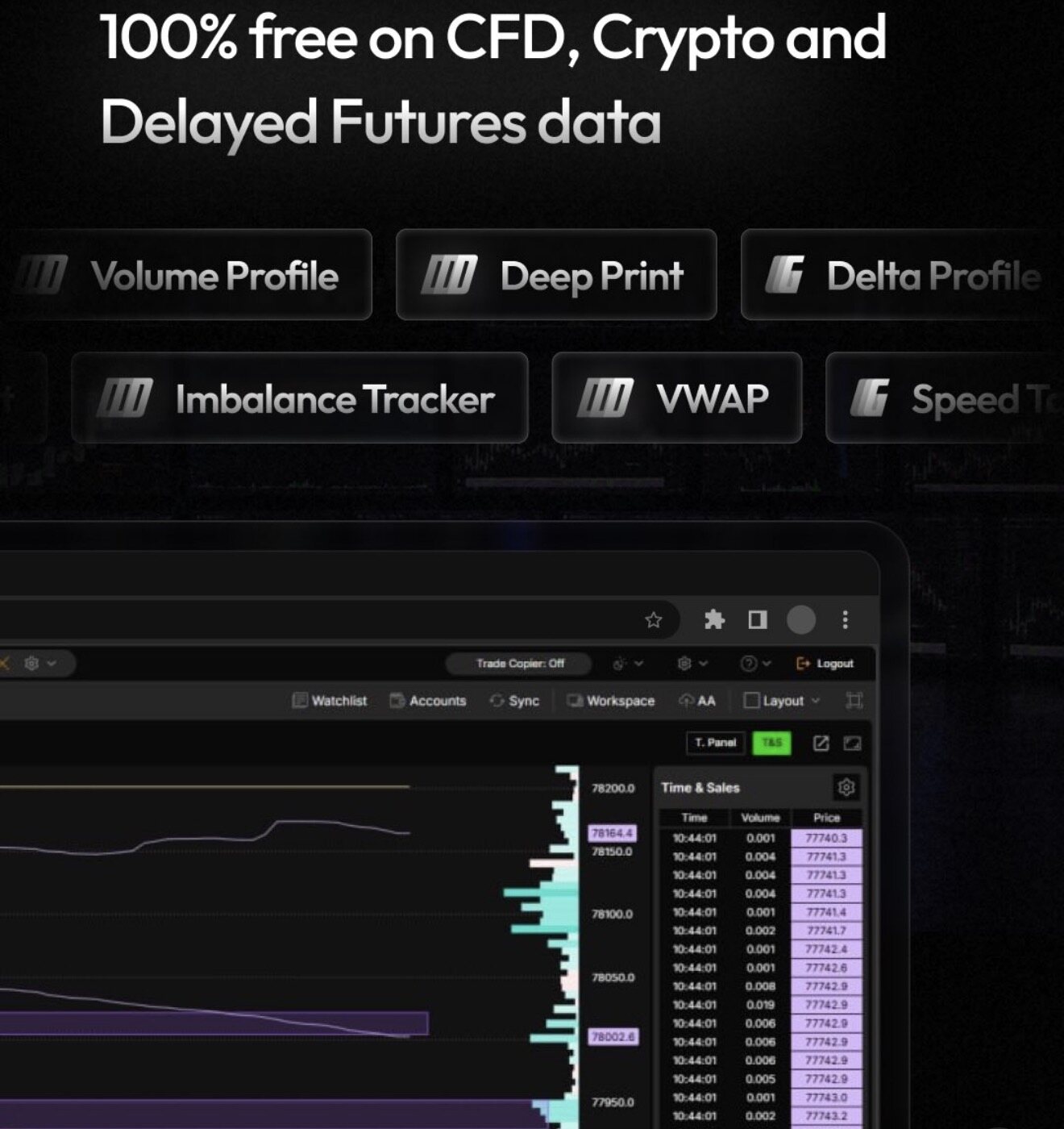
Visual © DeepCharts, launch announcement, November 1, 2026. On the right, Time & Sales with its Time, Volume and Price columns, next to the price ladder and the volume profile.
Crypto: real flow, in real time. A crypto exchange publishes every trade with its aggressor side. The footprint, delta and volume profile you see on BTCUSDT are therefore built on real trades. One limit to keep in mind: crypto trades on dozens of venues at once, and you only see the flow of the one feeding the chart. It is a very good learning ground, open 24 hours a day, weekends included.
Delayed futures: the right data, at the wrong time. This is CME data, ES, NQ or CL, exactly what futures traders watch. But delayed. To review a session, do your evening analysis, or learn to spot absorption or an imbalance, it is perfect. To trade live, it is useless: a footprint that arrives late describes a market that no longer exists.
CFDs: charts, not order flow. This is the most important point in this article, and the one you will not read in an announcement. A CFD is not traded on a central exchange: it is a contract with your broker whose price tracks the underlying market. A CFD's "volume" is therefore not the market's volume; at best it is the number of price changes or the broker's own activity. A footprint, a delta or a volume profile built on that has the shape of an order flow tool without its content. For chart analysis, VWAP or levels, no problem. For reading who is aggressing and who is absorbing, it is the wrong data.
In short: the free version is an excellent tool for learning and for reviewing your sessions. It does not replace real-time futures data for anyone trading the ES or the NQ live.
---
3. The six highlighted tools
The announcement puts six tools in the window. Here is what each one brings, with a link to the detailed page when one exists on the site.
- Volume Profile. The volume traded at each price over a period, with its POC (the most traded price) and its value area. It is the most visible tool in the screenshots. Before you treat it as a magnet, read why the POC does not pull price.
- Delta Profile. The same idea as the volume profile, but in delta: at each price, the difference between what was bought and what was sold at market. It shows where aggressors actually pushed, not just where a lot traded. On delta in general, and its traps, see the cumulative delta article.
- Imbalance Tracker. Spotting footprint imbalances, when one side clearly dominates the other across neighbouring levels. Stacked imbalances often mark the zones where one side took control.
- VWAP. The volume-weighted average price, with its bands, the institutional session benchmark. Visible in both screenshots.
- Speed of Tape. How fast trades are printing. A sudden acceleration signals that something is happening before price has even moved.
- Deep Print. An in-house DeepCharts tool whose details are not yet documented in their help centre on release day. I will complete this line as soon as the official page is published, rather than guess.
On top of that list comes Time & Sales, fully visible in the second visual: every trade with its time, volume and price. It is the simplest and most underrated order flow tool.
---
4. Mac, Chromebook, office computer: the end of Parallels?
This is the real break. Until now, DeepCharts was Windows only. On a Mac, the only option was a Windows virtual machine in Parallels Desktop, with two extra licences to pay and a platform running slower than on a native PC. It is the setup a good part of the community still uses.
With DeepCharts Web, a browser tab is enough. In practice, it opens DeepCharts to:
- a Mac, with no Parallels and no Windows licence;
- a Chromebook or a Linux PC, which had no option at all until now;
- a computer you cannot install anything on, your work machine for instance;
- a second screen or machine, to keep an eye on a chart without duplicating your whole setup.
One caveat though: a browser is still a browser. For scalping with several charts, a DOM and a heatmap open at once, the installed version on a real Windows machine remains the reference. For analysis, learning or lighter monitoring, the tab is more than enough.
---
5. Web or desktop: what the installed version keeps
On release day, the official visuals show a chart, profiles, VWAP, Time & Sales and a trading panel. They do not show several things that make the desktop version strong:
- The liquidity heatmap and the DeepDom DOM. Neither visual shows them. Reading the order book remains, for now, the installed version's territory.
- Tools that require order-by-order (MBO) data: Deep Trades, the iceberg detector. They need an MBO feed, paid depth that makes no sense on free or delayed data. The details are in the MBO vs MBP article.
- Gamma. There is already a dedicated browser version, sold separately: DeepGamma Web. Nothing suggests DeepCharts Web includes it.
I am not saying these tools will never reach the web, I am saying they are not shown there today. This article will be updated as new versions ship.
---
6. DeepCharts Web already existed at some prop firms
This is not quite a first. Several prop firms already gave their traders browser access to DeepCharts, plugged into their own data feed. Phidias builds DeepCharts right into its dashboard, in the browser, on desktop and on mobile, with nothing to install. Which firms provide the platform, and what each version contains, is covered on the prop firm order flow page.
So the news on November 1 is the opening to everyone, with no prop firm account, and free access on the three kinds of data described above.
---
7. What we do not know yet
On release day, honesty also means saying what is missing. As of November 1, 2026, neither the announcement visuals nor the public pricing page specify:
- the price of real-time futures data in the web version, or whether it goes through the current DeepChart licence or a separate offer;
- whether a desktop DeepChart licence gives access to the web version, and whether workspaces sync between the two (a "Sync" button does appear in the interface);
- which real-time data feeds the web version accepts (dxFeed, Rithmic, or only prop firm feeds);
- how long the futures delay is, and how much history is available;
- phone or tablet use, which the announcement does not mention.
I will update this article as these points are confirmed, with the date of each check. If you test the platform first, feedback is welcome on the Discord.
---
8. Where to start
Here is a simple way to get the most out of the free version tonight:
- Open web.deepcharts.com in your browser and load a real-time BTCUSDT chart.
- Display Volume Profile, Delta Profile and Time & Sales. Watch what happens when price reaches a heavily traded level: does delta keep pushing, does the tape speed up or slow down?
- Place orders on the DEEP SIM account. Nothing replaces execution to understand what you are reading.
- In the evening, reopen the ES or the NQ on delayed data and review your futures session with the same tools.
- When you want real-time futures, the heatmap, the DOM and the MBO tools, that is the DeepCharts licence.
Activate DeepCharts with promo code OFF →: our link opens DeepCharts with code OFF already filled in at the Payment step, and an extra 10% off the licence. Arriving without it? Enter OFF in the promo code field yourself. Plan-by-plan details are on the DeepCharts promo code page, and everything free at DeepCharts is gathered on the free DeepCharts page.
To get started, our tutorials cover setup tool by tool, and the Discord is there for questions.
This is a partner link and it keeps this site running. The caveats in this article, about CFDs, delayed data and what the web version does not show yet, are here because they are true, not because they help sell.
---
Frequently asked questions
What is DeepCharts Web?
It is the browser version of the DeepCharts order flow platform, launched on November 1, 2026 at web.deepcharts.com. It opens in a tab with nothing to install, and carries over the desktop charting interface: indicators, drawing tools, Time & Sales, trading panel and a simulation account.
Is DeepCharts Web free?
Yes, on three kinds of data: CFDs, crypto and delayed futures, according to the official announcement of November 1, 2026. Real-time CME futures are not part of the free offer. On the DeepCharts licence, promo code OFF gives an extra 10% off, pre-filled by the OrderFlowFutures link, otherwise entered at the Payment step.
Can you use DeepCharts on a Mac without Parallels?
Yes, since November 1, 2026, with DeepCharts Web: the platform opens in the browser, so on Mac, Linux or Chromebook, with no virtual machine and no Windows licence. The desktop version remains Windows only and still needs Parallels Desktop on a Mac.
Which tools are available in DeepCharts Web?
The launch announcement highlights Volume Profile, Deep Print, Delta Profile, Imbalance Tracker, VWAP and Speed of Tape, along with Time & Sales, drawing tools and a simulation account. The liquidity heatmap, the DeepDom DOM and tools that require MBO data do not appear in the launch visuals.
Can you read order flow on CFDs with DeepCharts Web?
Not really. A CFD is a contract with your broker, not a product traded on a central exchange: its volume is not the market's volume. A footprint or delta built on it has the shape without the content. For order flow, real-time crypto or delayed futures are far more reliable data.
What is the difference between DeepCharts Web and DeepGamma Web?
DeepCharts Web is the charting and order flow platform in the browser, free on CFDs, crypto and delayed futures. DeepGamma Web, released in October 2026, is the gamma exposure (GEX) module in the browser, sold separately with its own subscription.
Latest decoded trading sessions
A real trading day read live on the heatmap and the footprint: macro events, the levels that held, and every read with its DeepCharts screenshot.
- ESMonday, November 2, 2026ES Rebounds After Intel Rout: Oil Below $100, ISM and Apple Ahead of Midterms8 decoded reads
- NQMonday, November 2, 2026NQ Rebounds After Worst Session Since June, ISM and Apple in Focus
- ESFriday, October 30, 2026ES Down 1%: Amazon and Intel Drag Tech Lower, ECI and Musalem on Deck
Want to get better at order flow?
We discuss flow, liquidity and our trades live, every day, on the OrderFlowFutures Discord. Join us, it's free.
Join the Discord for free12 online·110 members·Free · instant access
Read next
Get the new guides
One email when we publish an OrderFlow or Heatmap guide. No spam, one-click unsubscribe.
By subscribing, you agree to receive our emails. Educational content, not investment advice.