Trading ES in order flow with DeepCharts, DeepDom and DeepGamma: the complete course
Window 1: DeepGamma, the map
DeepGamma computes market makers' gamma exposure on SPX options, from the CBOE participant data, and projects it onto the ES price. You open an options chart (New, Option Chart, SPX with the ES-CME symbol): the window title becomes "SPX → ES-202612". The data only covers cash market hours and refreshes about once a minute, sometimes several minutes behind the candles.
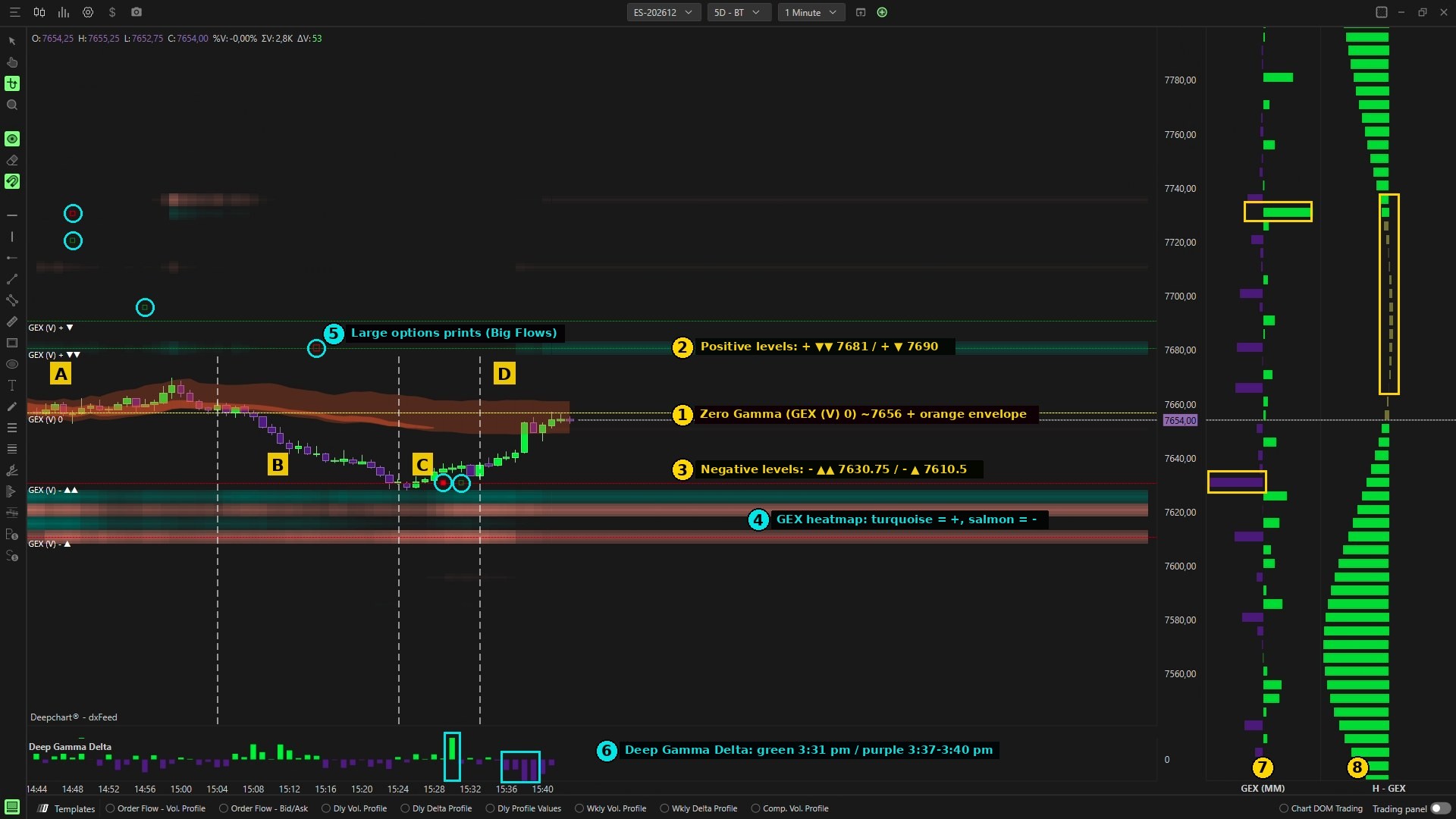
The eight tools numbered on the capture: ① Zero Gamma and Gamma Envelopes, ② and ③ ranked positive and negative levels, ④ GEX heatmap, ⑤ large options prints, ⑥ Deep Gamma Delta, ⑦ GEX (MM) column, ⑧ H-GEX column.
The rest of this lesson is for students
- The tool stack and its settings
- Three setup rules that prevent reading errors
It's free: join the Discord, click the Student role, then log in with Discord here to access all courses.
→ The alerts to set and the settings recap