Trading ES in order flow with DeepCharts, DeepDom and DeepGamma: the complete course
Window 3: DeepDom, the order book
DeepDom reads the ES order book order by order (MBO) and paints it over time. It is the timing window: it says who is resting at a price right now, who is aggressing, and how a wall reacts on contact. The capture below, taken on November 3, 2026 at 4:47:06 pm, serves as the reference for the whole course: every zone on it is numbered.
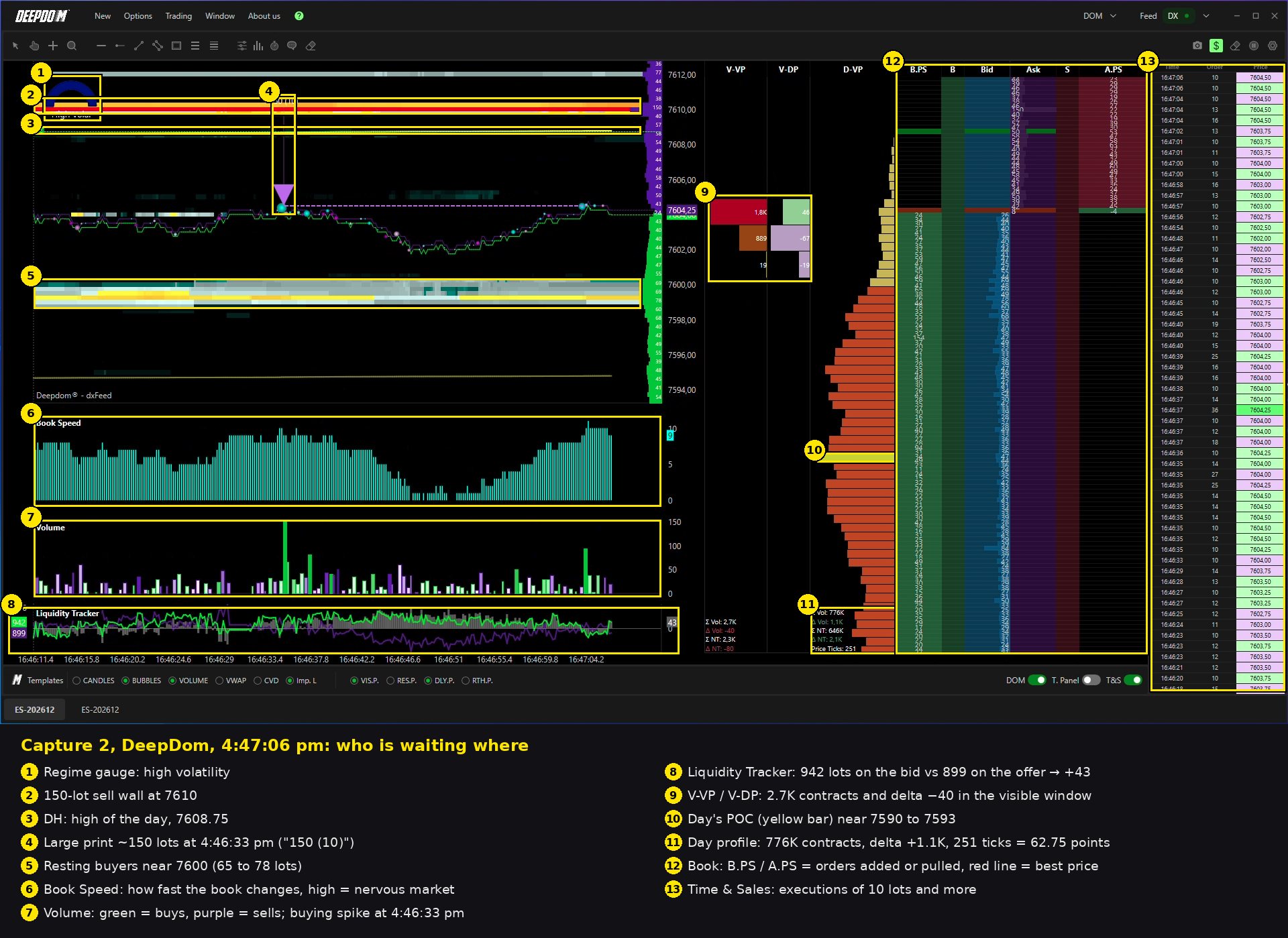
From left to right: heatmap and price with bubbles, resting sizes column, Book Speed, Volume, Liquidity Tracker, V-VP, V-DP and D-VP profiles, order book with the B.PS, B, Bid, Ask, S, A.PS columns, then the Time & Sales filtered at 10 lots.
The rest of this lesson is for students
- The zones of the screen and the setting of each
- The order book detectors
- The Risk Manager
It's free: join the Discord, click the Student role, then log in with Discord here to access all courses.
→ Window 1: DeepGamma, the map