Published
The DeepCharts Trade Copier mirrors a parent account's orders onto one or more child accounts in real time, so you can run several prop firm accounts with a single set of clicks. Prerequisite: every account connected in DeepCharts. This tutorial covers creating a group, every configuration field, starting it, managing groups, the recommended settings and Client mode for OCO brackets.
- Your data feed and trading accounts connected in DeepCharts (otherwise the status stays on Waiting Connection)
- Having checked with your prop firm what it allows regarding trade copying between accounts
- A SIM account to test the configuration before going live: the feature is still in Beta
Step by step
- 01
Open the Trade Copier
In the DeepCharts menu bar, open Trading then Trade Copier - Beta. Take the Beta label seriously: it is a recent feature, and DeepCharts itself recommends validating it on a simulation account before using it on funded accounts. The Trade Copier - Beta window opens, empty until a group exists.

The DeepCharts Trading menu dropped down, with the Trade Copier - Beta entry highlighted.© DeepCharts - 02
Create a group
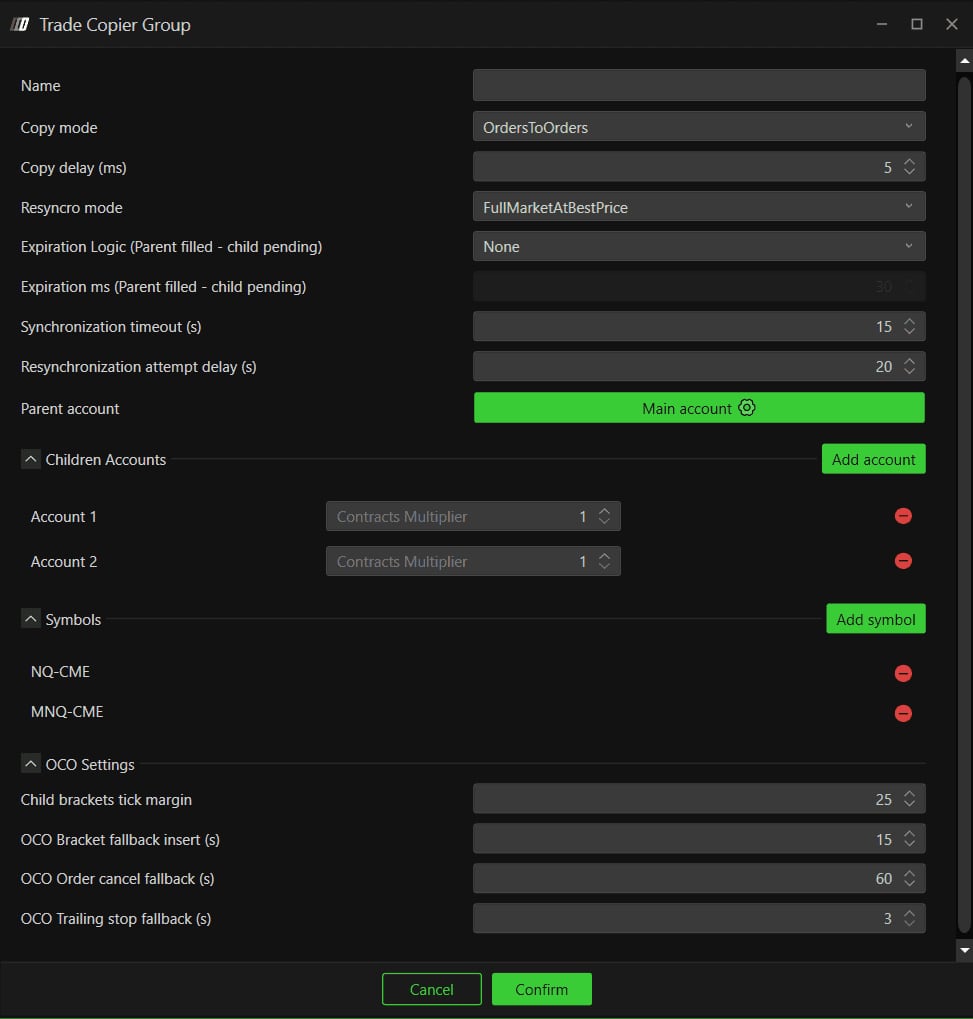
Click Add new group, bottom left. A group is a set of linked accounts with its own copy rules: one parent that places the orders, children that receive them. You can create several and run them at the same time, for instance one group per prop firm when their constraints differ. The Trade Copier Group window opens: start by giving it a meaningful Name, since that is what appears in the left column.
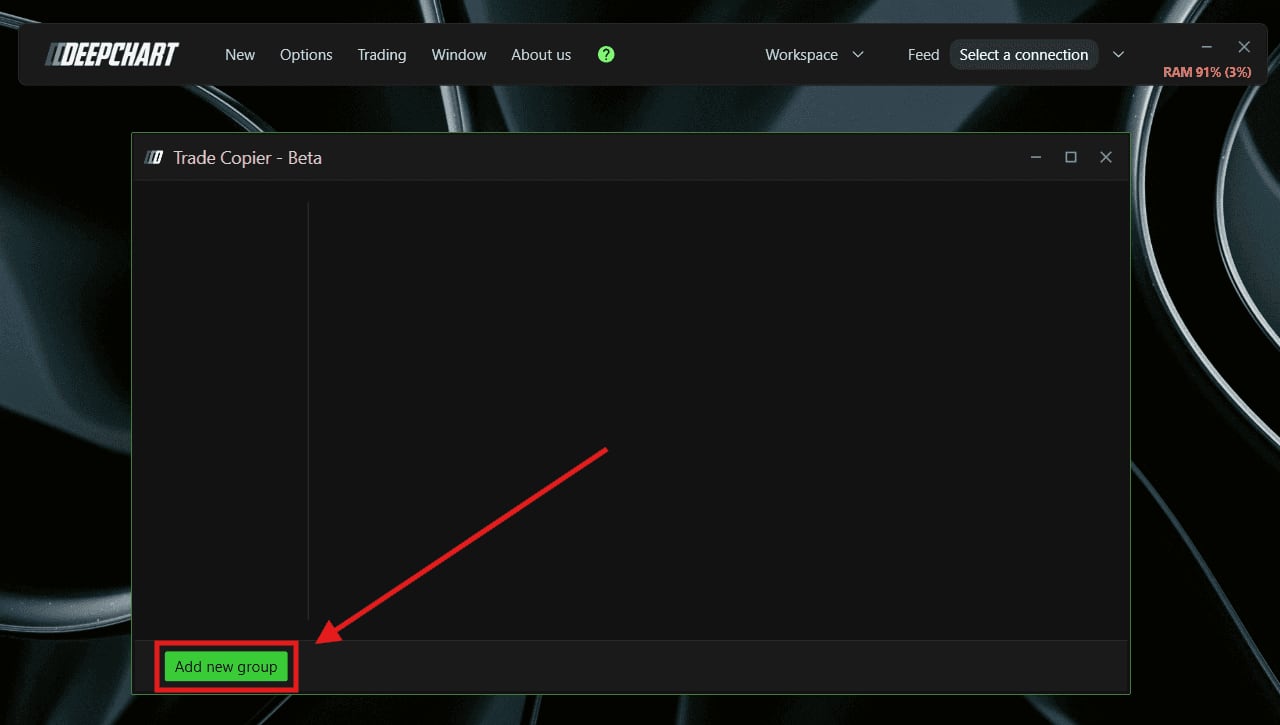
The empty Trade Copier - Beta window, with an arrow pointing at the Add new group button.© DeepCharts - 03
Pick the Copy mode and Copy delay
Copy mode decides how a parent order reaches the children. OrdersToOrders, the default, copies the order as is: a limit on the parent becomes a limit on every child, no slippage, but nothing guarantees they all fill. On NQ in a fast market, the parent's limit can be hit and filled while a child's sits pending. OrdersToMarket instead waits for the parent order to execute, then sends a market order to the children: they always stay in line, at the cost of possible slippage. Copy delay (ms) adds a delay before replication, 5 ms by default; DeepCharts recommends 0 for the fastest copy.
- 04
Set resynchronisation and expiration
Resyncro mode (Resync Mode in the documentation) says what happens when a child drifts away from the parent, after a disconnection, a delay or a manual trade. None does nothing, fixing it is up to you. FullMarketAtBestPrice, the default, sends whatever orders it takes to realign the child, whatever the situation. CloseOnlyAtBestPrice only closes a child's excess contracts and never opens any to catch up with the parent. Expiration Logic (Parent filled - child pending) handles a child order left pending while the parent is filled: None (default) leaves it, ToMarketAfterMs turns it into a market order, CancelAfterMs cancels it, after the delay entered in Expiration ms, a field greyed out until one of those two options is selected. Synchronization timeout (15 s) sets how long before two accounts are deemed out of sync, Resynchronization attempt delay (20 s) the interval between resync attempts.
- 05
Assign the parent, children and symbols
Parent account designates the account whose trades get copied: click it and pick from the available connections. Under Children Accounts, Add account adds each receiving account, with its Contracts Multiplier: at 2, one contract on the parent becomes two on the child. Last, the Symbols section is the one that catches people out: only symbols added with Add symbol are copied. If you switch between NQ and MNQ on the parent, both must be listed, as in the opening screenshot with NQ-CME and MNQ-CME. Forget one and the trade stays alone on the parent.
- 06
Set the OCO Settings and confirm
The four OCO Settings fields matter when your trades carry stop and target brackets. Child brackets tick margin (25) is the tick margin within which the copier ties a child bracket to the parent bracket, because in a fast market fill prices differ slightly from one account to the next. OCO Bracket fallback insert (15 s) inserts the bracket on the children if the server did not. OCO Order cancel fallback (60 s) cancels a stop still live on a child after the target was hit, if the server did not cancel it. OCO Trailing stop fallback (3 s) is the fallback delay for syncing a trailing stop. Then click Confirm.
- 07
Start the group and accept the disclaimer
Back in the Trade Copier panel, the group shows Status: Stopped, with two tables, Parent Account and Children Accounts, each listing its connection, account, multiplier on the child side and status. Check that every account reads Ready: Waiting Connection means the connection is not up, and nothing will be copied to that account. Then click Start. A Disclaimer appears: it warns that delays, position discrepancies or differences in fill prices can occur, and recommends monitoring positions and orders in real time through the Account widget. Actually read it, it is an honest description of what a trade copier is. Yes launches the group, which switches to Running with a tick next to its name.
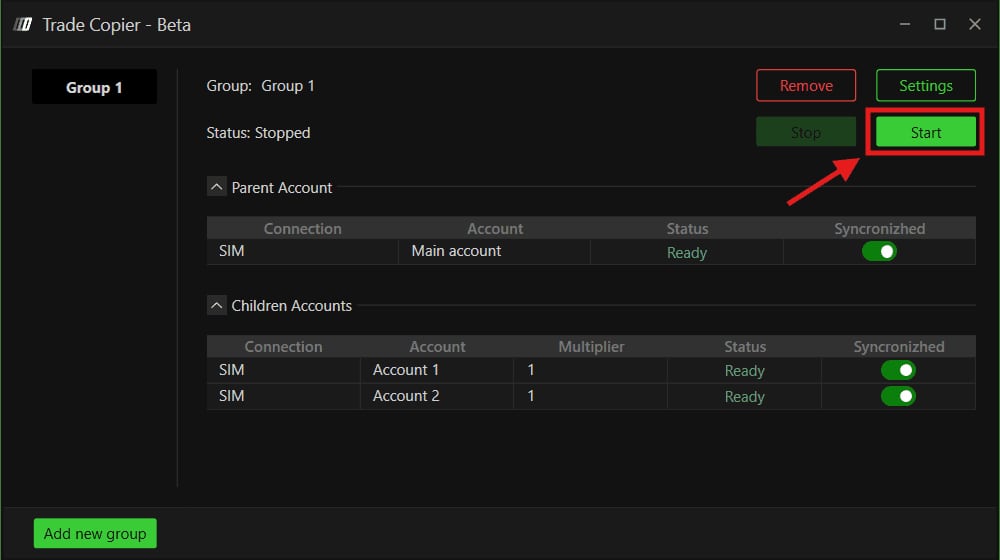
The Group 1 panel stopped, parent account and two child accounts in Ready, Start button highlighted.© DeepCharts - 08
Manage running groups
Everything is driven from the panel. Stop pauses the group's copying, Settings reopens its configuration, Remove deletes it for good. Each account's Syncronizhed switch (spelled that way on screen) takes a single account out of the copy without stopping the whole group: handy when a prop account has just hit its target or its daily limit and must stay flat. Add new group stays available to build more groups with different settings.
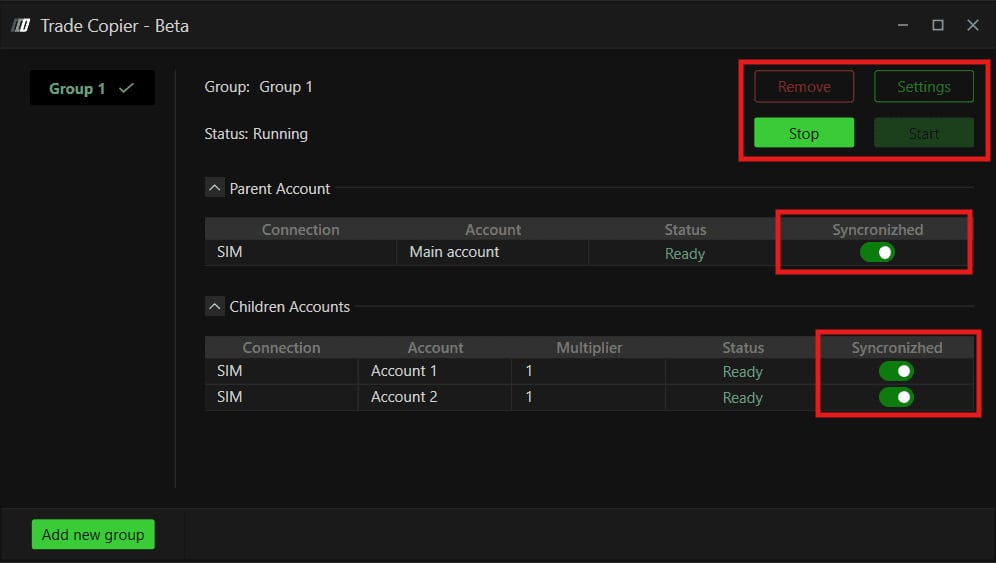
A group in Running status, Remove, Settings and Stop buttons, and Syncronizhed switches highlighted.© DeepCharts - 09
Start from the recommended settings
DeepCharts publishes a starting point that departs from the defaults: OrdersToOrders, Copy delay at 0, Resyncro mode on None to avoid automatic market orders fired in the middle of volatility, Expiration Logic on None (and CancelAfterMs rather than ToMarketAfterMs if you want automatic handling), 15 s and 20 s for the two sync delays. Treat it as a baseline, not gospel: DeepCharts notes these settings will not suit every strategy and recommends testing yours on a SIM account before going live.
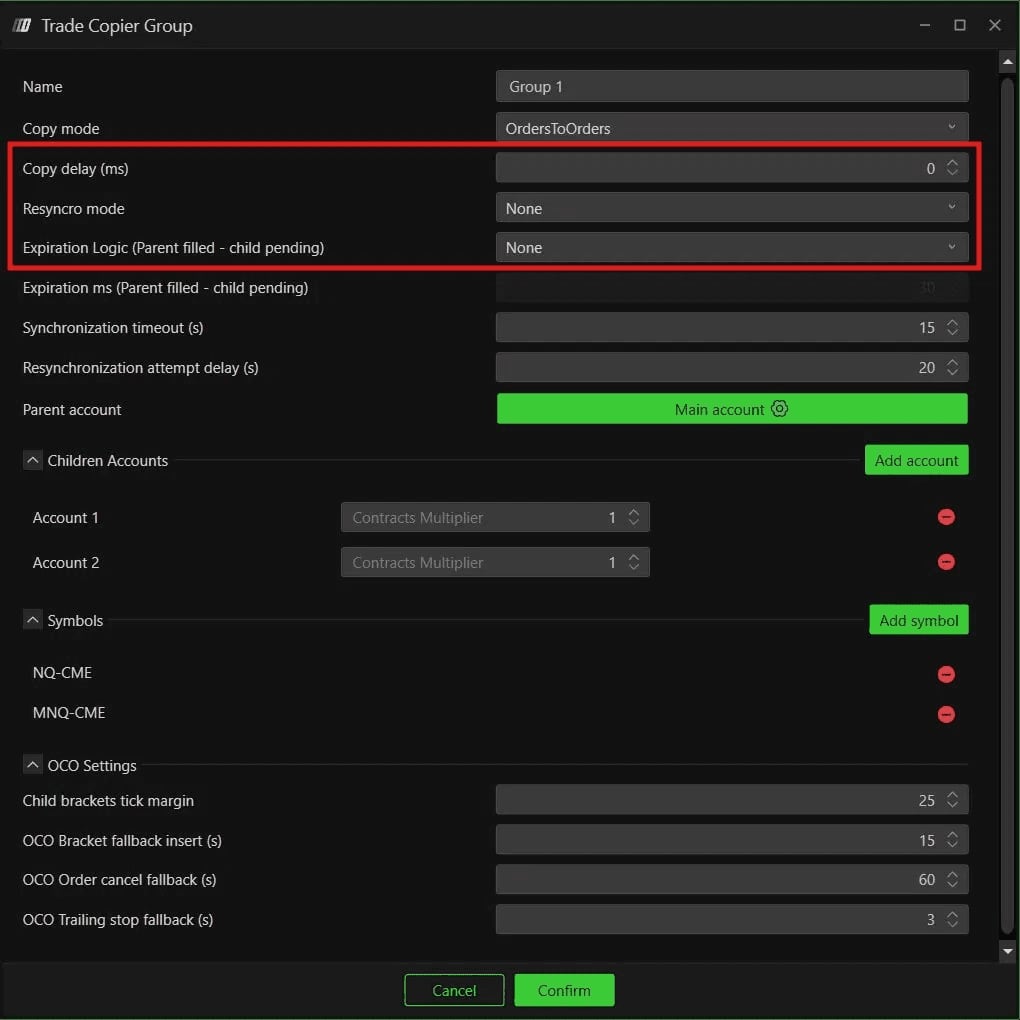
The Trade Copier Group window with Copy delay at 0, Resyncro mode and Expiration Logic on None.© DeepCharts - 10
Switch OCO Strategy to Client mode
If you trade with OCO Strategy, one last setting lives on the chart, not in the copier. Open your chart and scroll to the very bottom of the trading panel on the right: two options, Server (default) and Client. On Server, brackets are handled by the broker's server, but some brokers do not support server side OCO with the Trade Copier and brackets then replicate poorly on the children. Select Client: DeepCharts itself now manages the brackets, which means keeping the platform open and connected for as long as you have live trades.
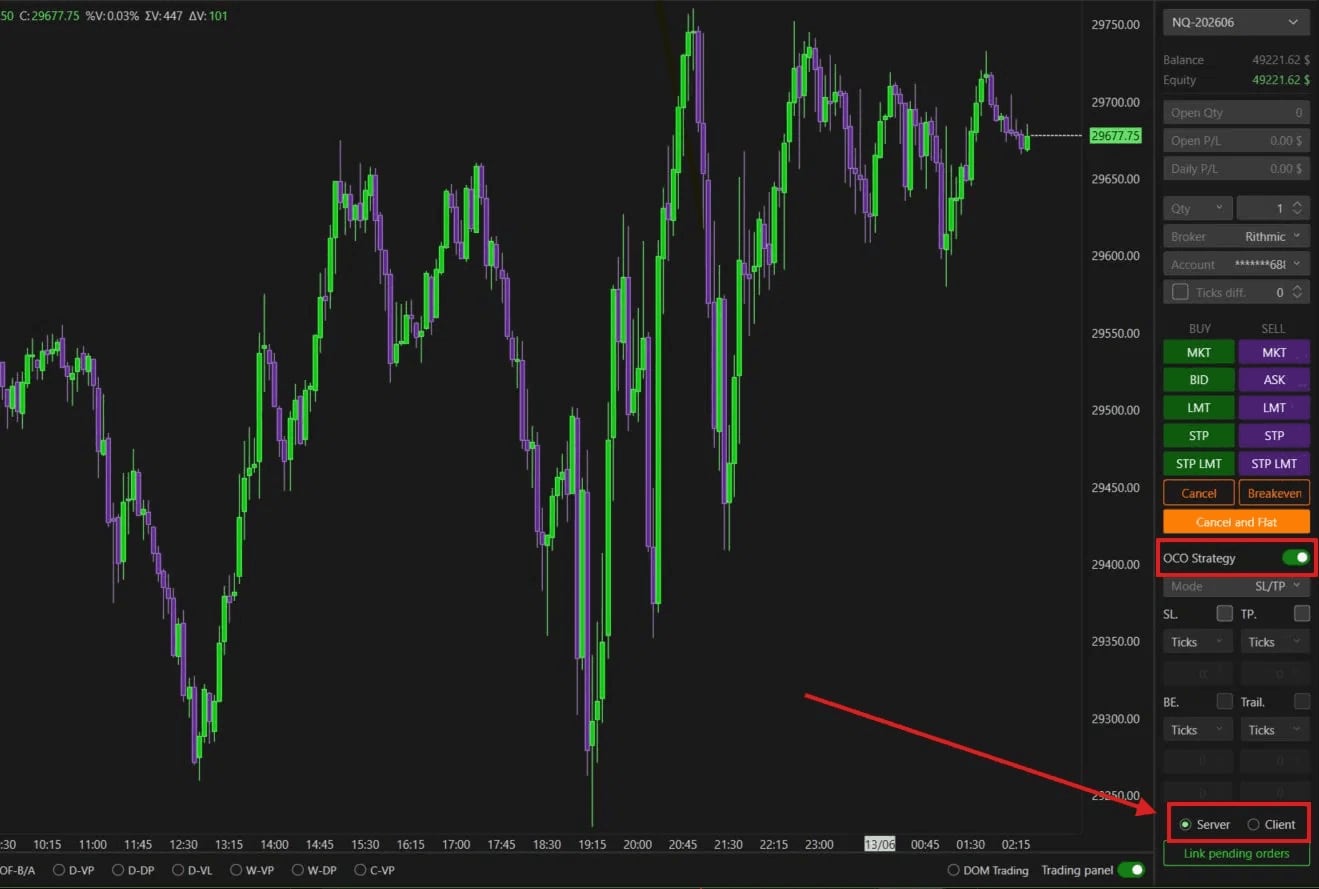
The trading panel of an NQ chart with OCO Strategy on and the Server and Client options highlighted.© DeepCharts
Settings, tab by tab
Trading, Trade Copier - Beta, then Add new group or Settings on an existing group.
The name shown in the panel's left column.
OrdersToOrders copies the order as is (no slippage, risk of an unfilled child). OrdersToMarket waits for the parent fill then goes to market (children in line, possible slippage).
Recommended: 0, unless you have a specific reason to delay copying.
None: no action. FullMarketAtBestPrice: realigns the child no matter what. CloseOnlyAtBestPrice: only closes the excess. Recommended: None.
ToMarketAfterMs sends the child order to market, CancelAfterMs cancels it, after the Expiration ms delay.
Only active with ToMarketAfterMs or CancelAfterMs.
Set too low, it triggers false out of sync alerts caused by normal execution delays.
Interval between two resync attempts.
Ready status once the connection is up, Waiting Connection otherwise.
Child to parent size ratio: at 2, one parent contract gives two child contracts.
Only listed symbols are copied: add NQ and MNQ separately if you trade both.
Tick margin to tie a child bracket to the parent bracket.
Fallback insertion of the bracket on children if the server did not do it.
Fallback cancellation of the stop left live after the target was hit.
Fallback delay to sync a trailing stop.
Start goes through a Disclaimer accepted with Yes.
Takes one account out of the copy without stopping the group.
At the bottom of the trading panel, below the OCO settings.
Brackets handled by the broker's server, platform can be closed. Some brokers do not support it with the Trade Copier.
Brackets handled locally by DeepCharts: platform open and connected at all times, otherwise stop and target do not execute.
⚠ Traps to avoid
- Leaving a symbol out of the Symbols list. Only listed symbols are copied: an MNQ trade when only NQ is in the group stays on the parent account, with no message to warn you.
- Keeping the defaults without reading them. Resyncro mode sits on FullMarketAtBestPrice: a drifting child gets realigned by orders sent automatically, volatility or not. And a manual trade placed on a child account is precisely one of the out of sync cases this mode corrects.
- Switching OCO to Client then closing DeepCharts with a position open. In Client mode the platform manages the brackets: closed or disconnected, your stop and target no longer execute.
- Setting a Contracts Multiplier without looking at the child account. At 2, one contract on the parent becomes two on the child, so twice the risk, on an account whose loss limit may be tighter than the parent's.
- Assuming your prop firm accepts trade copying. Prop firm rules on copying trades between accounts vary from one firm to the next and change over time: check your own firm's terms before wiring the copier to funded accounts.
- Going live without testing. The feature is in Beta and DeepCharts itself recommends validating the configuration on a SIM account, with your own strategy, before using it for real.
FAQ
OrdersToOrders or OrdersToMarket: which one should I pick?+
OrdersToOrders, the default and the one DeepCharts recommends, copies the same order type everywhere and avoids slippage, with the risk that a child stays pending while the parent is filled. OrdersToMarket guarantees the accounts stay aligned by going to market once the parent fills, at the cost of possible slippage on the children.
Why didn't a child account receive my trade?+
Three checks, in order: is the traded symbol in the group's Symbols list, is the account's Syncronizhed switch on, and does the account read Ready rather than Waiting Connection in the panel. Also confirm the group is actually Running.
Can I run several groups at the same time?+
Yes. Each group has its own parent, children, symbols and settings, and they can all be Running simultaneously. That is useful when your accounts belong to prop firms or challenges with different constraints.
Do prop firms allow the Trade Copier?+
It depends on the firm, and sometimes on the account type. Rules on copying trades between accounts vary from one prop firm to another: read your firm's terms, or ask its support, before turning copying on for evaluation or funded accounts.
Should I switch OCO to Client mode?+
If you use OCO Strategy with the Trade Copier and your brackets do not replicate correctly, yes: some brokers do not support server side OCO with the copier. The trade off is clear: in Client mode, DeepCharts must stay open and connected for as long as you have live trades.
Want to get better at order flow?
We discuss flow, liquidity and our trades live, every day, on the OrderFlowFutures Discord. Join us, it's free.
Join the Discord for free9 online·82 members·Free · instant access