Updated · first published
What is Risk Manager?
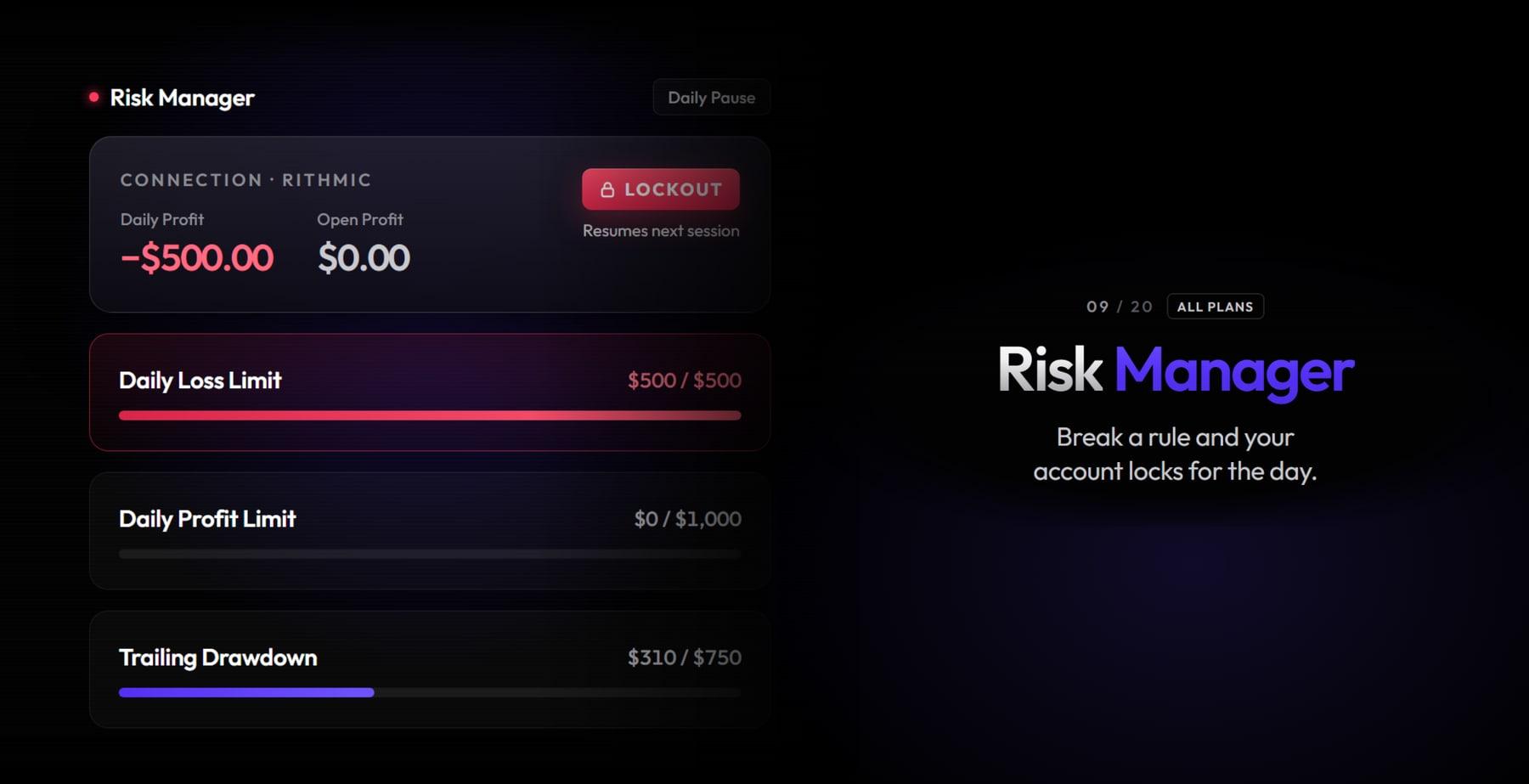
Almost every blown account is blown after the limit, not before: the day goes badly, the personal rule breaks, and size doubles to make it back. A risk manager moves the decision out of the moment when you are least able to make it. The DeepDom one watches your positions continuously and, if a rule you set is broken, locks the account for the day. Unlocking happens at six in the evening New York time, or through support.
Our link opens DeepCharts with code OFF filled in at the Payment step. Black Friday: retype code OFF at the Payment step. Pre-filled by our link it stays at -10%; erased and typed again, it goes to -20%.
What DeepCharts does better
Rules sit at three levels, which is rare. At day level: a daily loss limit in dollars or percent, a daily profit limit with automatic closing of open positions, and a daily trailing stop, meaning a drawdown measured from the day's peak, with three possible reactions, pause until the session ends, pause for a set duration, or flatten without locking. At portfolio level: total loss and total profit across all contracts open at once. At position level: loss and profit per trade. Two simple, effective guardrails come on top, an allowed trading time window and a symbol whitelist that removes the wrong-instrument mistake. The overview shows one card per connection, simulation or live account, with the day's realised and unrealised result.
Using it day to day
The use worth the detour, for anyone trading a funded account: copy your prop firm's exact rules into the Risk Manager, daily loss and drawdown, but with a safety margin. If the firm cuts at a thousand dollars of daily loss, set eight hundred. You then never lose the account to a mechanical breach, only to a run of losing days, which is a different problem and a fixable one. The daily trailing setting is the most useful of the lot, because it attacks the scenario that actually kills: a day at plus six hundred handed back to minus a thousand.
Typical trailing case: you open strong, plus eight hundred dollars in an hour, then the market goes sideways. With no rule you give half of it back forcing trades, and the other half trying to recover the first. With a daily trailing set at four hundred, the platform pauses you when the result comes back to plus four hundred. The day is green, and above all the day is over while it is still green.
⚠ The trap to avoid
The trap fits in one sentence: this runs client side. It assumes the platform is open and the machine is awake. A dropped connection, a sleeping laptop, an accidental close, and the protection stops applying while the positions keep existing at the broker. It complements the server-side protections of your broker or prop firm, it does not replace them. The second trap is more human: setting limits so wide they never trigger, to feel protected without ever being protected.
Combine it with
The Risk Manager is not a market-reading tool, it is what protects the rest. It pairs with the simulation environment to test a new rule at no risk, and with Deep Replay to replay the session that triggered the lock and understand what happened before the limit. For funded traders, read it alongside your firm's drawdown rules, whose mechanics vary far more than the marketing suggests.
FAQ
What happens when a rule is broken?+
The account is locked for the day: no more orders from the platform. Unlocking happens at six in the evening New York time, or through support. Some rules, such as the daily trailing stop, allow a temporary pause or a simple flatten instead.
Does the Risk Manager protect me if the platform is closed?+
No. It runs client side and assumes the platform is open. A dropped connection, sleep mode or an accidental close, and monitoring stops while positions stay open at the broker. It is an extra layer of discipline, not a server-side safety net.
Can I copy a prop firm's rules into it?+
That is the best use of it. Take your program's daily loss and drawdown and set them with a fifteen to twenty percent safety margin. The account then becomes very hard to lose to a mechanical breach.
Does the Risk Manager protect my account when the platform is closed?+
No. Its settings window is called Money Managment Settings (client side): the manager operates on the client side, so if the platform is closed it does not run. A position left open while DeepDom is not running is watched by none of your rules.
How do I unlock an account locked by the Risk Manager?+
By waiting for the reset, which reopens the account automatically at 18:00 EST for a daily lockout. Before that, the only route is asking DeepDom support to unlock it from the backend, which can take some time. Worth knowing before you set a tight limit.
Which action should I choose on a breach?+
Daily pause, the default, if the goal is to stop for the day. Time pause for a short break whose length is entered in Pause time (minutes). Flat closes positions without locking, so it does not stop you resuming immediately, which empties the rule of its purpose.
What is the difference between a position limit and a portfolio limit?+
The position limit watches one trade at a time and flattens the one that breaches it. The portfolio limit watches the sum of open positions: an ES and an NQ held together can each stay under their individual limit while the combined loss already exceeds what you were prepared to accept for the day.
Which timezone is the trading window set in?+
The global window is in EST, the CME timezone, and its title says so: LIMIT TRADING HOURS (EST TIMEZONE). But the window you can set symbol by symbol, in the Maximum Quantity dialog, is in exchange time. The two timezones coexist in the same tool.
Tutorial & settingsPortfolio Risk Manager: the complete setup, rule by rule
+The nine rule sections, the three actions available on a breach, and the two limits of the system you need to know before relying on it.
The Portfolio Risk Manager enforces your risk rules in your place: instead of deciding to stop once you have lost what you had set, you declare it once and the platform locks the account for you. It covers daily loss and profit, the trail loss limit, portfolio and position limits, the permitted trading window and a symbol list with a maximum quantity. Two facts to know before relying on it: the settings window calls itself Money Managment Settings (client side), so with the platform closed it protects nothing, and once the lock has triggered, manual unlocking goes through DeepDom support.
- An active DeepDom licence, and at least one broker or SIM connection configured
- Having written your limits down before entering them: the Risk Manager enforces what you declare, it does not advise you
Step by step
- 01
Open the portfolio and read its controls
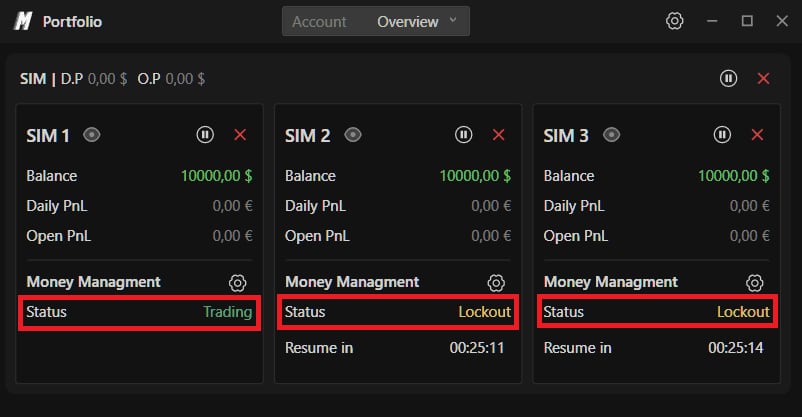
The Risk Manager lives in the portfolio, not in the chart settings. Go to Trading in the top navigation bar, then Show Portfolio. The Portfolio window opens on its two tabs, Account and Overview. Each connection's header shows its name, its D.P for the day's result and its O.P for the unrealised, with two buttons that act immediately and without any rule being set: pause locks every account under the connection for a chosen duration among one, ten, thirty and sixty minutes or the entire session, the cross flattens every position. Below that header, each account gets its card with its Balance, its Daily PnL and its Open PnL, the same pause and close pair for itself alone, an eye that opens its detailed view, and a Money Managment line whose gear leads to the rules. That is where the account's Status is read: Trading, or Lockout with a Resume in and its countdown.
Screenshot to comeThe DeepDom Portfolio window, with a SIM connection and three accounts, two of them in Lockout status with their countdown.
- 02
Turn the manager on and frame the symbols
The gear opens the Money Managment Settings (client side) window, whose title already says the essential part. The GENERAL section arrives entirely switched off: Enable is OFF, so nothing is enforced until you turn it on. Then come three symbol fields that have to be read together. Symbols - All categories is on, Symbols - Filter category is on Future, and Symbols - Exclude not listed is off. That last one is the guardrail that matters: switched on, only the symbols added by hand in the Symbols section can be traded, which is the safe way never to place an order on the Mini thinking you are trading the Micro.
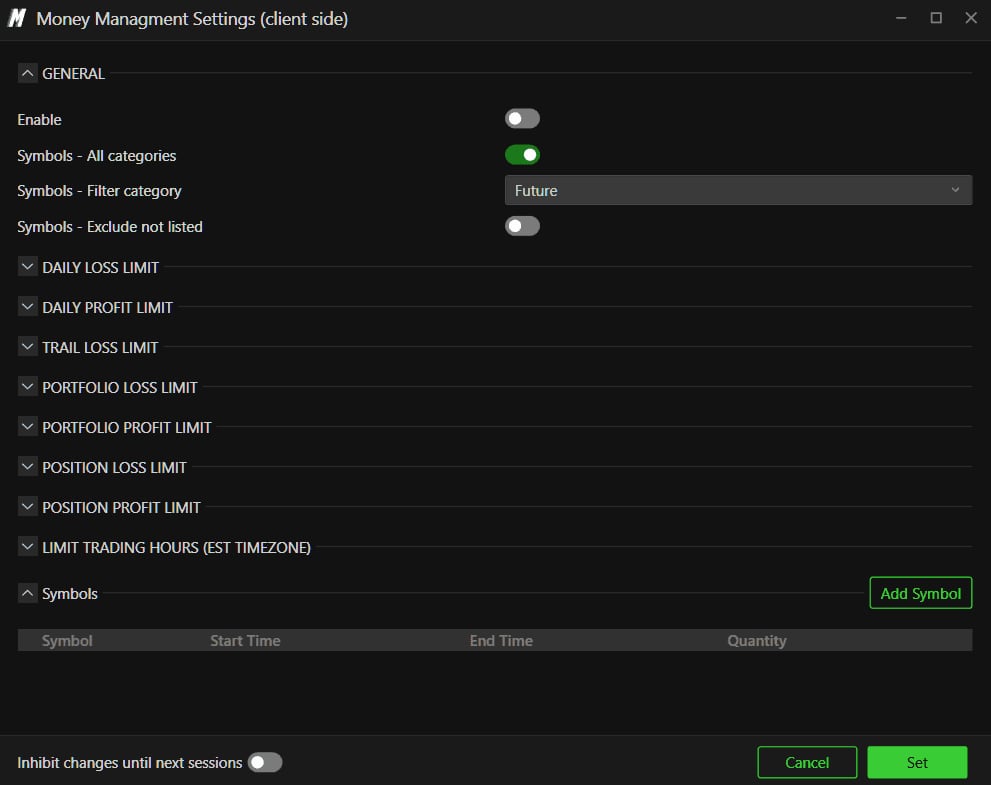
The Money Managment Settings (client side) window with its GENERAL section expanded and the list of its nine rule sections.© DeepCharts - 03
Set the daily limits and the trail loss limit
DAILY LOSS LIMIT, DAILY PROFIT LIMIT and TRAIL LOSS LIMIT are built on the same mould: Enable, Action, Value, Unit between Money and Percentage, an Include open positions switch, and Pause time (minutes). Everything arrives at zero and disabled. The field worth your attention is Action, because it decides what happens on a breach and because it sits on Daily pause by default. Daily pause locks the account for the session, Time pause locks it for the duration entered in Pause time, and Flat closes positions without locking, so it lets you come back within the minute. If the idea is to stop, Flat cancels the point of the rule. The TRAIL LOSS LIMIT is the one that most resembles funded account rules: it fires when open profit retraces by more than the limit.
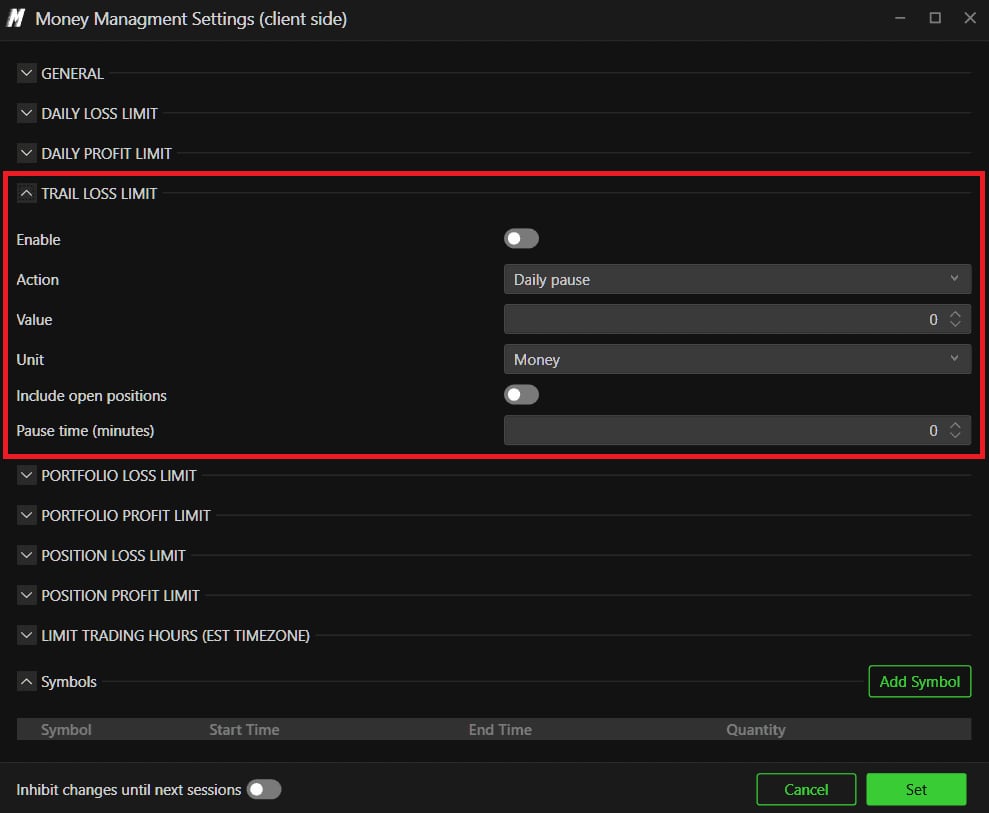
The TRAIL LOSS LIMIT section, with Action on Daily pause, Unit on Money and Pause time in minutes.© DeepCharts - 04
Add the portfolio and position layers
Four more sections cover what the daily limits let through. PORTFOLIO LOSS LIMIT and PORTFOLIO PROFIT LIMIT apply across all open positions: an ES and an NQ held at the same time can each stay under their individual limit while the combined loss already exceeds what you were prepared to accept. POSITION LOSS LIMIT and POSITION PROFIT LIMIT work the other way round on a single position, which is flattened automatically on a breach. These four sections carry the same fields as the previous ones with one exception, and it is a useful one: in place of Include open positions they have Cumulative per symbol, which adds up the positions on the same symbol instead of judging them one by one.
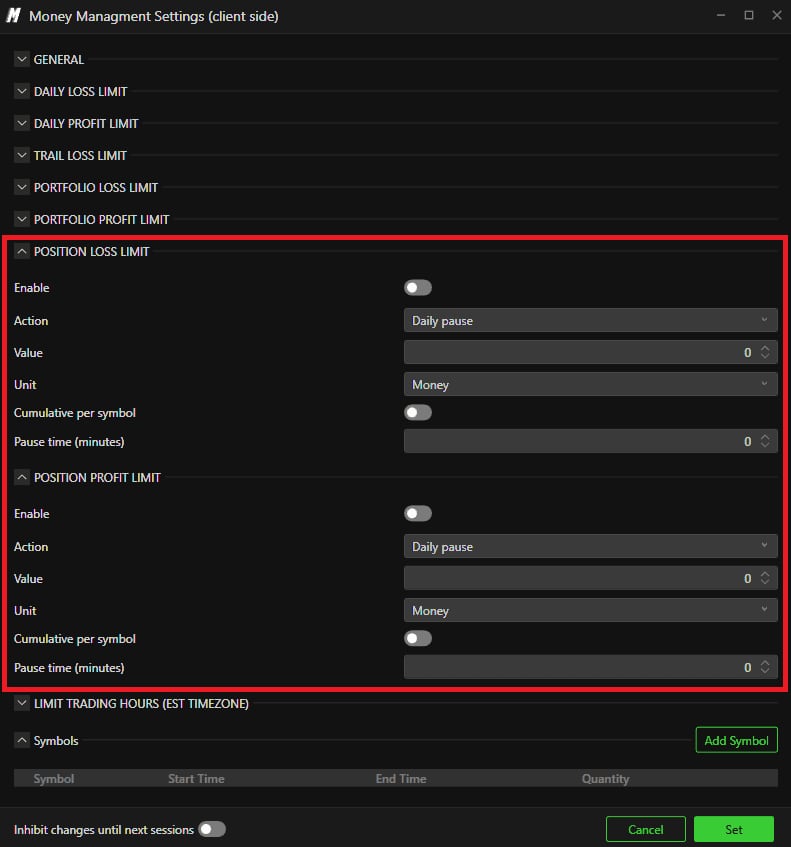
The POSITION LOSS LIMIT and POSITION PROFIT LIMIT sections, with their Cumulative per symbol field.© DeepCharts - 05
Bound the hours, list the symbols, lock your own settings
LIMIT TRADING HOURS (EST TIMEZONE) carries its timezone in its title: the time is in EST, independent of your computer's timezone and your chart's. The Symbols section at the bottom holds the permitted list with an Add Symbol button: it opens an instrument picker by exchange, then a Maximum Quantity window carrying two blocks, LIMIT QUANTITY with a maximum number of contracts, and LIMIT TRADING HOURS (EXCHANGE TIMEZONE) with a Begin and an End. Note the timezone difference between the two windows, global in EST and per symbol in exchange time: it is a source of mistakes. Finally, at the very bottom of the window, the Inhibit changes until next sessions switch is the most interesting of the lot: enabled, any change to your rules only takes effect on the next session, which stops you loosening a limit at the precise moment it gets in the way. Nothing is stored until you click Set.
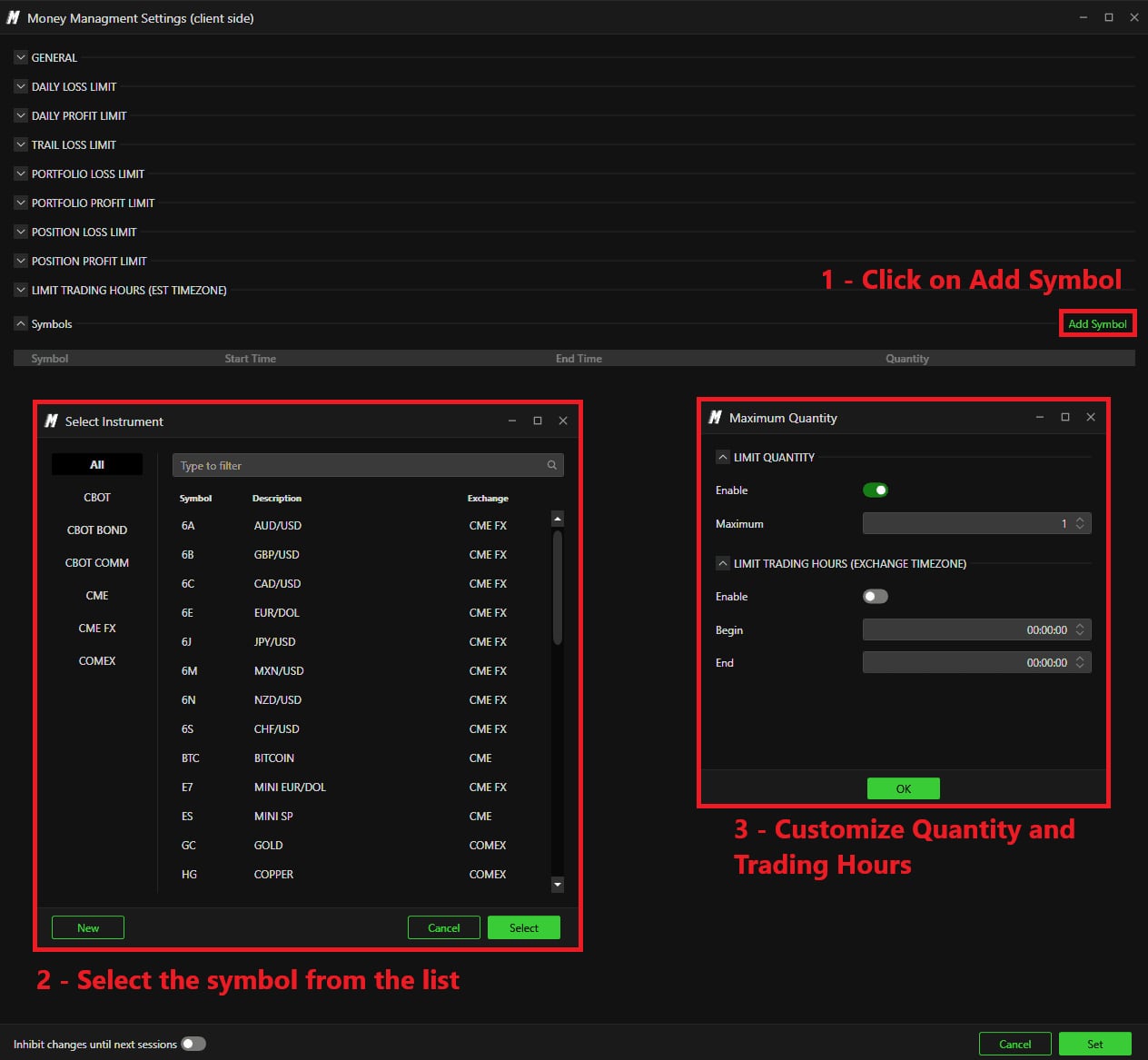
The Symbols section with the Add Symbol button, the instrument picker and the Maximum Quantity window.© DeepCharts - 06
Know what happens when the lock falls
When a rule is breached, the account's Status changes to Lockout, with a Resume in and its countdown. Daily resets follow the CME timezone, so EST, and an account locked for the day unlocks automatically at 18:00 EST. Before that, the documentation is explicit: the only way to unlock an account after the Risk Manager has triggered is to ask the DeepDom support team to do it from the backend, and that can take some time. Read it as a warning before setting a tight limit, not as a flaw: it is precisely because you cannot unlock yourself that the rule is worth anything.
Screenshot to comeTwo accounts in Lockout status in the Portfolio window, with their Resume in countdown.
Settings, tab by tab
Trading then Show Portfolio. These controls act without any rule being set.
Day's result and unrealised, aggregated across every account under the connection.
Locks, with a countdown.
At connection or account level.
Plus an eye to the detailed view and the Money Managment gear.
Lockout shows a Resume in and its countdown.
Money Managment Settings (client side) window. Everything arrives switched off.
Client side: platform closed, the manager does not run.
Switched on, only the symbols in the Symbols section can be traded.
Three sections on the same mould, all disabled out of the box.
Time pause locks for the duration entered, Flat closes without locking so it lets you come straight back.
Percentage as the alternative.
Only used when Action is Time pause.
Four sections. Portfolio = the sum of open positions, position = one trade at a time.
Adds up the positions on the same symbol instead of judging them one by one.
Independent of your computer's timezone and your chart's.
The permitted list, and the limits specific to each symbol.
Filtered by exchange: CBOT, CME, CME FX, COMEX.
Maximum number of contracts on that symbol.
⚠ In exchange time, where the global window is in EST.
Rule changes only take effect on the next session. The real protection against yourself.
Nothing is enforced until you click it.
CME timezone, independent of your machine.
From the backend, and it can take some time.
⚠ Traps to avoid
- Believing the Risk Manager protects you at all times. Its own window is titled Money Managment Settings (client side): it runs on the client side. Platform closed, machine asleep, session ended, and no rule applies any more to what lives at the broker.
- Setting your limits and not turning Enable on. The GENERAL section arrives disabled: rules entered into a manager that is switched off apply to nothing, and nothing tells you so.
- Mixing up the two timezones. The global window is in EST, the per symbol window in the Maximum Quantity dialog is in exchange time. Both carry their timezone in their title, and that is exactly why.
- Choosing Flat as the action. Closing positions without locking lets you come back within the minute, which cancels the point of the rule. If the idea is to stop, it is Daily pause.
- Setting a very tight limit without reading the unlock procedure first. After a trigger the account reopens on its own at 18:00 EST; before that, only DeepDom support can unlock it from the backend, and that can take some time.
- Forgetting Inhibit changes until next sessions at the bottom of the window. Without it your rules can be edited at the precise moment they inconvenience you, which is the moment they were worth something.
Latest decoded trading sessions
A real trading day read live on the heatmap and the footprint: macro events, the levels that held, and every read with its DeepCharts screenshot.
- ESFriday, November 20, 2026S&P 500: six straight losses, rotation out of chips ahead of Waller and Michigan
- FDAXFriday, November 20, 2026DAX Outlook, 20 November 2026: FDAX Down 1.2% as AI Sell-Off and German Inflation Hit Frankfurt
- NQFriday, November 20, 2026Nasdaq 100: AI selloff spreads to chipmakers ahead of Waller and Michigan data
Want to get better at order flow?
We discuss flow, liquidity and our trades live, every day, on the OrderFlowFutures Discord. Join us, it's free.
Join the Discord for free20 online·125 members·Free · instant access